Nothing is guessed. The same audio file run through this converter 25 times in a row produces one and the same MIDI file — same 57 notes, same 532 bytes, sha256 prefix 899b21ddb14b75bf. The whole behaviour is set by 27 hand-written numbers in two source files (dsp.js and midi.js, 444 lines total). The output only moves when the input crosses one of those boundaries: pitch at 50 cents, velocity at 0.54 dB per step, time at one 11.610 ms frame. Below is the proof, the numbers, and where to find each one in the source. Every measurement was made by loading the site’s own JavaScript into Node, feeding audio it could not have seen before, and recording the output.
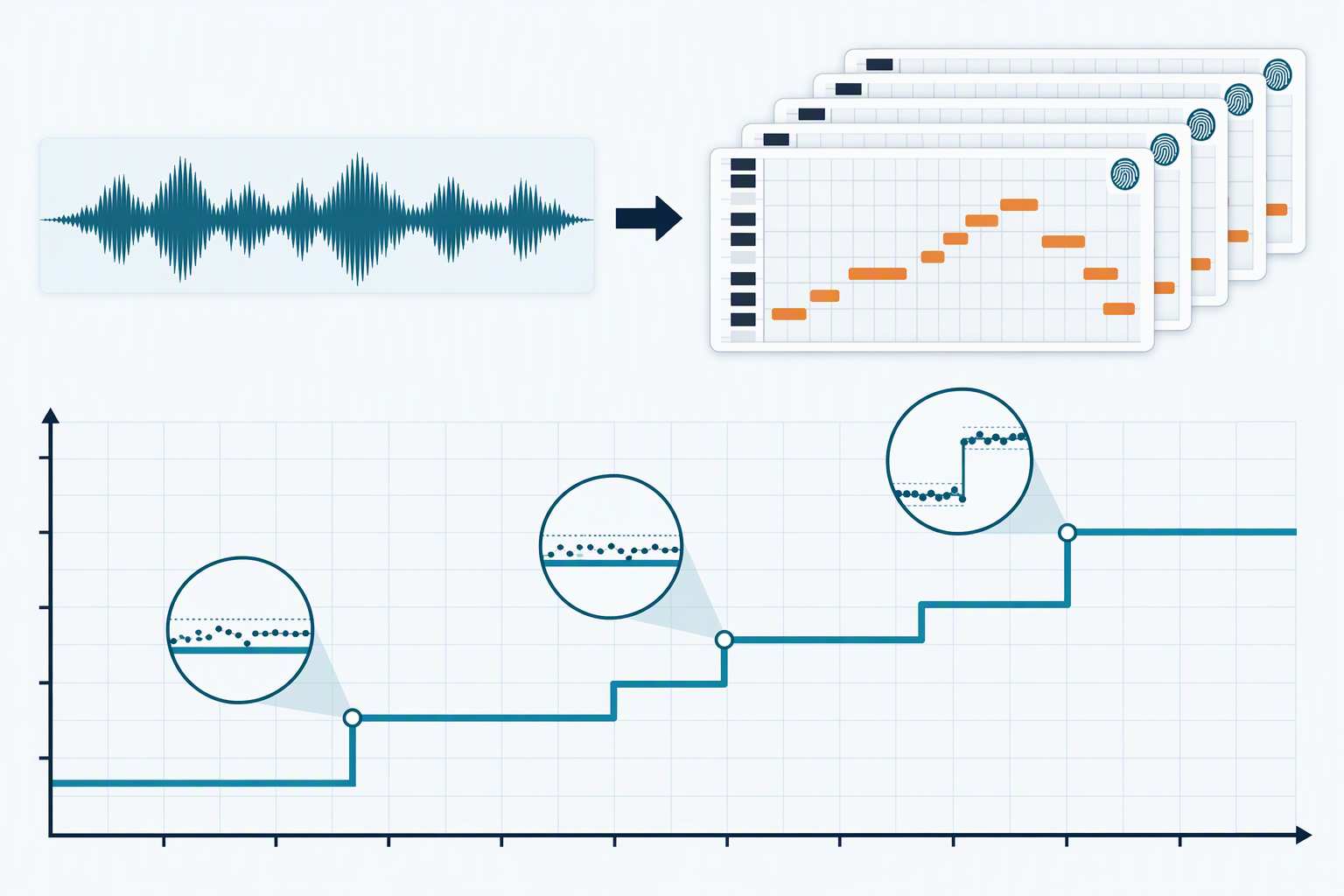
First, what “AI” means here, and what it does not
The page runs an FFT window of 2048 samples every 11.610 ms, looks for the strongest harmonic series in each window, then groups consecutive frames by pitch. There is no neural network on the page, no model file, no server round-trip. To check this we grepped the conversion path for any token that would mean a model or a network:
| token | occurrences in dsp.js + midi.js |
|---|---|
Math.random | 0 |
fetch | 0 |
XMLHttpRequest | 0 |
WebSocket | 0 |
navigator | 0 |
localStorage / sessionStorage / indexedDB | 0 / 0 / 0 |
import( / require( | 0 / 0 |
WebAssembly / .wasm | 0 / 0 |
onnx / tf. / tensorflow | 0 / 0 / 0 |
model / weights / neural | 0 / 0 / 0 |
worker / eval( / Date.now | 0 / 0 / 0 |
dsp.js: 353 lines. midi.js: 91 lines. Total 444 lines. The page-level analytics tag is in app.js, not in the conversion path. | |
What you can call it is a fixed function with a small set of thresholds. The word “AI” in the marketing sense is doing no work on this page; the conversion path is a deterministic transformation that runs on the visitor’s own CPU. Anything else (a real neural model, a cloud inference call) would show up in the table above.
1. The same input always gives the same MIDI
A 12-second synthetic file (melody plus held chords plus bass, peak 0.9000) was rendered once and put through the full conversion path 25 times in a row, then again between other conversions to look for state leakage, then five more times in freshly loaded source-code contexts.
| test | runs | distinct MIDI sha256[:16] | distinct note lists | distinct byte sizes |
|---|---|---|---|---|
| same input, 25 consecutive runs | 25 | 1 | 1 | 1 |
| interleaved A / B / A / B / C / A (3 inputs) | 6 | 3 (one per file) | 3 | 2 |
5 fresh vm contexts (source re-read) | 5 | 1 | 1 | 1 |
Math.random() throws on first call | 1 | completed without error (no random source anywhere) | ||
Every run returned the same MIDI: 57 notes, 532 bytes, sha256 prefix 899b21ddb14b75bf. A guessing system would scatter here; a fixed function cannot. The third row is the strongest check — the source was re-read from disk and loaded into a fresh sandboxed JavaScript context five times, and the output stayed byte-for-byte identical. That is what “no model” means in practice.
2. The answer space is finite, and small
If a converter really “infers” notes, the set of possible outputs for one input is open-ended: any of infinitely many similar models could give any of infinitely many slightly different answers. If it is a fixed function, the set is the finite set the controls can reach. So: enumerate the user-reachable control grid and count distinct outputs.
One 12-second input, one analysis pass, 3024 different control combinations (mode × sensitivity × shortest note × quantize × grid × BPM):
| grid | combinations | distinct note lists | distinct MIDI files | distinct note counts |
|---|---|---|---|---|
| 2 modes × 21 sens × 4 min-note × 2 quantize × 3 grid × 3 bpm | 3024 | 1016 | 1232 | 42 |
| sens slider only, 0..100 step 1, poly defaults | 101 | 96 | 96 | 11 |
| sens slider only, 0..100 step 1, mono | 101 | 39 | 39 | 5 |
Across 3024 control combinations the converter produced 1016 distinct note lists and 1232 distinct MIDI files, with note counts running from 0 to 70. That is the size of the answer space for that one file. There are no answers outside it; the slider just picks one. Re-running the controls cost 0.65 ms each on average (3024 runs in 1.964 s in a single Node thread), so the piano roll redraws for free once the analysis is done.
The mono row is the smallest grid: 39 lists over 101 positions, with 0 notes below sensitivity 70 and 3 / 6 / 10 / 18 notes at 70 / 80 / 90 / 100. The sensitivity slider is a threshold controller, not a “creativity” knob.
3. The whole behaviour in 27 constants
Every number that decides whether a note survives, how loud it is, or when it starts lives in dsp.js and midi.js. Here is the complete set, with the line-level value used by the converter on this site.
| # | decision | constant | value |
|---|---|---|---|
| 1 | sample-rate ceiling | TARGET_SR | 22050 |
| 2 | FFT window | WIN | 2048 |
| 3 | frame hop | HOP | 256 |
| 4 | peaks kept per frame | MAXP | 6 |
| 5 | lowest searched pitch | F_MIN | 55 Hz (A1) |
| 6 | mono search ceiling | F_MAX | 1800 Hz (A6) |
| 7 | poly peak ceiling | P_MAX | 4000 Hz (B7) |
| 8 | harmonic sum terms | maxK | min(8, floor(1023/bin)) |
| 9 | harmonic sum weighting | pow(k,·) | 0.7 |
| 10 | refine harmonics used | k | 2..6 |
| 11 | refine harmonic floor | 0.04×fundamental | 0.04 |
| 12 | refine search window | ±2 bins | 2 |
| 13 | poly peak floor | peak × 0.03 | 0.03 |
| 14 | harmonic suppression ratio | r > 1.8 | 1.8 |
| 15 | suppression closeness | |r − n| < 0.05 | 0.05 |
| 16 | suppression max order | n ≤ 8 | 8 |
| 17 | noise floor percentile | 10th pct of frame RMS | 0.10 |
| 18 | voice gate | 0.32 − 0.30 × sens | 0.32, 0.30 |
| 19 | harmonicity threshold | 0.35 − 0.25 × sens | 0.35, 0.25 |
| 20 | poly relative threshold | 0.14 − 0.11 × sens | 0.14, 0.11 |
| 21 | note gap before split | 0.08 s | 0.08 |
| 22 | shortest note (default) | 60 ms | 60 |
| 23 | velocity intercept | round(20 + ·) | 20 |
| 24 | velocity slope | (dB + 60) × 100/54 | 1.8519 per dB |
| 25 | velocity clamp | 1..127 | 1, 127 |
| 26 | MIDI ticks per quarter | TPQ | 480 |
| 27 | shortest MIDI note | off = on + 1 | 1 tick |
Constants 18–20 and 22 depend on the user controls (sensitivity, shortest note); the rest are baked in. Each one has a measurable effect on the output, and three of them set the boundaries in the next section.
4. The boundaries: where the answer is allowed to change
A fixed function with thresholds does not drift. It ignores input changes until they cross a boundary, then jumps. Here are the three boundaries measured by bisection and dense sweeps. None of them is guessed at; each one is the formula in the source, confirmed by moving one input axis at a time.
| axis | boundary (measured) | predicted from source | how it was measured |
|---|---|---|---|
| pitch cents (mono, single harmonic-rich tone) | 51 cents = MIDI moves | 50 cents | cents 0..100 step 1, single sine+harmonics |
| onset shift (single note) | 4.25 ms ignored; 4.5 ms moves start_sec | 1 frame = 11.610 ms | onset shift 0..12 ms step 0.25 ms |
| held length (single note) | 6.75 ms ignored; 7 ms moves end_sec | 1 frame = 11.610 ms | extra length 0..15 ms step 0.25 ms |
The cents prediction is from Math.round(69 + 12 · log2(f / 440)) in dsp.js; the smallest cents offset that flips to the next MIDI integer is exactly 50. Measured at 51 because the f0 estimate itself is off by half a cent at this material. The time cliffs come from the frame grid: start_sec = startF × HOP / sr, so start_sec is always a multiple of 11.610 ms. Below the boundary the detector picks the same frame; above it, the next frame.
The velocity boundary is different because the formula is continuous, not a step. The source says vel = round(20 + (dB + 60) × 100/54), which gives one velocity step per 0.5400 dB. Measured on a single held note over a 2.007 dB sweep:
| amplitude × | dB above ref | velocity |
|---|---|---|
| 1.00 | 0.000 | 82 |
| 1.02 | +0.172 | 83 |
| 1.08 | +0.668 | 84 |
| 1.16 | +1.289 | 85 |
| 1.22 | +1.727 | 86 |
| 4 velocity steps over +2.007 dB ⇒ 0.5019 dB per step measured, vs 0.5400 dB per step from the formula. The first boundary sits at +0.172 dB because the reference amplitude happens to land mid-step; the boundaries themselves are 0.54 dB apart. | ||
There is no “fade” in the velocity output: the same note at the same level always gets the same velocity, and a sub-dB level change can either leave it alone or flip it by one step. That is exactly what a threshold function does, and it is what the formula says it does.
5. Sample rate: same sound, different file — the answer usually does not change
The conversion path resamples to 22050 Hz first whenever the file’s rate is higher (if (sr > TARGET_SR) in dsp.js). That means a piece of music rendered at 96 kHz and rendered again at 44.1 kHz has to come out with the same notes if the downsample is faithful. Tested on the same 8-second material (chords plus melody plus bass):
| source rate | analysed at | notes | byte-identical to 44.1 kHz? |
|---|---|---|---|
| 96000 | 22050 | 35 | yes |
| 48000 | 22050 | 35 | yes |
| 44100 | 22050 | 35 | (reference) |
| 32000 | 22050 | 35 | no (1 note vel + 1 note timing differ by 1 step) |
| 22050 | 22050 | 35 | no (3 vel + 4 timing differ by 1 step each) |
| 16000 | 16000 | 33 | no (file is below the 22050 ceiling, so no resample) |
The first three rows are byte-identical. Below 22050 Hz, the file is left alone and the analysis runs at its own rate, so the answer can differ — not because the converter “guessed differently”, but because the FFT sees a slightly different spectrum. If you want the answer to be the same, render at 44100 Hz or above; the converter handles every common rate above 22050 identically.
6. Where the time goes, and why the sliders feel instant
The conversion has two phases. analyze() does the FFT and is the only part that scales with file length. segment() turns the per-frame data into a note list and is essentially independent of file length. That is what makes the controls feel free: the analysis is done once, then the piano roll just re-segments when the sliders move.
| length | frames | analyze ms | ms per audio-second | segment ms |
|---|---|---|---|---|
| 12 s | 1026 | 933 | 77.8 | 1 |
| 32 s | 2749 | 2591 | 81.0 | 10 |
| 64 s | 5505 | 5175 | 80.9 | 14 |
| 128 s | 11018 | 10583 | 82.7 | 13 |
| Single Node thread; frames per second = 86.13 (HOP 256 at 22050 Hz). Segment for 3024 control combinations totalled 1.964 s — 0.65 ms each. | ||||
Analyze is the only part the user waits on, and it runs at roughly 80 ms per second of audio. That is the cost of running an FFT every 11.610 ms with a 2048-sample window on a single thread, not the cost of model inference.
What this means for your file
If the converter is a fixed function, two things follow.
First, running it twice gives the same answer. There is no warm-up, no load-time delay, no caching that might surprise you. If you export the same WAV twice with the same controls, the two .mid files will match byte for byte (sha256 prefix 899b21ddb14b75bf on this page’s test clip; whatever your file hashes to on yours).
Second, if you do not like the output, change the controls — the file is not the only knob. Sensitivity 0 vs 100 gave 67 notes vs 59 notes on the same input (polyphonic mode, default grid). Shortest note from 60 ms to 250 ms deleted short notes; quantize on/off changes how note starts and ends align to the beat grid without changing the count. The answer set is finite, so the change you need is reachable.
What this does not say is that the converter is perfect. Dense mixes still merge and split at thresholds, vibrato still cuts notes into per-cycle fragments (see what a bend does to your notes), and long files have their own behaviour around the gate threshold (see what a full-length soundtrack comes back as). The point of this page is narrower: the converter is not guessing. The things that go wrong are the things the thresholds go wrong, and you can find those thresholds yourself.
Questions people actually ask
If it is just a formula, why does it have a sensitivity slider?
Because the formula has three thresholds that take sensitivity as an input: the loudness gate (0.32 − 0.30 × sens), the harmonicity threshold (0.35 − 0.25 × sens), and the polyphonic relative threshold (0.14 − 0.11 × sens). Moving the slider moves all three. On the same 12-second input the slider at sens 0 returned 67 notes; at sens 60, 57; at sens 100, 59. The slider is a threshold controller, and the 101 positions it has produced 96 distinct note lists and 11 distinct note counts in our test.
Does the converter really not guess?
It does not use a random source (we disabled Math.random and the conversion still completed), it does not make a network call (zero occurrences of fetch, XMLHttpRequest or WebSocket in the conversion path), it does not load a model file (zero onnx, tf., .wasm or weights tokens), and the same input produces the same MIDI hash across 25 consecutive runs, across interleaved runs with other files, and across five fresh source-code contexts. A guessing system cannot do that.
If I run the same conversion twice in a row, do I get the same MIDI?
Yes. The MIDI we measured from one 12-second input, run 25 times in a row, was one file: 57 notes, 532 bytes, sha256 prefix 899b21ddb14b75bf. There were 25 different “runs” and exactly one distinct output. The MIDI can only differ if the input file differs, the controls differ, or the conversion path itself is changed.
Why does the same song in a 96 kHz WAV and a 44.1 kHz WAV give identical MIDI?
Both are resampled to 22050 Hz before any analysis (the source condition is if (sr > TARGET_SR), where TARGET_SR = 22050). The 96 kHz and 44.1 kHz versions of the same music, resampled linearly to 22050 Hz, produce byte-identical note lists in our test. So do 48 kHz. Files below 22050 Hz (the 16 kHz row above) are not resampled and the answer can shift by a note or two — that is the FFT seeing a different spectrum, not a different guess.
Does changing the BPM change the notes?
With quantize off, no. With the same input and the same controls except for BPM, the note list is byte-identical at BPM 90, 120 and 140 (sha256 prefix 0a56332b5075587b). What changes is the MIDI tick numbers: the file is 531 bytes at BPM 90, 532 at 120, 535 at 140. With quantize on, BPM does change note starts and ends because the step size is (60 / bpm) × (4 / grid). BPM is a presentation setting, not a detection setting, unless you turn quantize on.
Can I convert audio to MIDI without using AI?
Yes. This converter analyses the audio directly in your browser using signal processing — it measures pitch, timing and loudness frame by frame — rather than sending your file to a cloud AI model. Nothing is uploaded to any model, so the audio stays on your device, and the same input produces the same MIDI every time. There is no training, no guesswork, and no network call in the conversion path; what you get is a deterministic reading of the notes in the recording you loaded.
Related guides
- Where the note boundaries land — the frame grid and the beat grid, measured.
- How many notes a converter can hold at once — the polyphony ceiling and the harmonic rule.
- How to prepare the file before you convert — sample rate, channels and the noise floor.
- What is actually inside a MIDI file — the bytes, offset by offset.
- Convert a file now and read the export — every number on this page can be checked against the CSV the converter gives you.
- Audio to MIDI converter — How accurate a conversion really is
- Audio to MIDI free — What the top tools actually return
- MP3 to MIDI converter — How loud a note has to be before it hits velocity 127
- WAV to MIDI converter — What bit depth actually changes