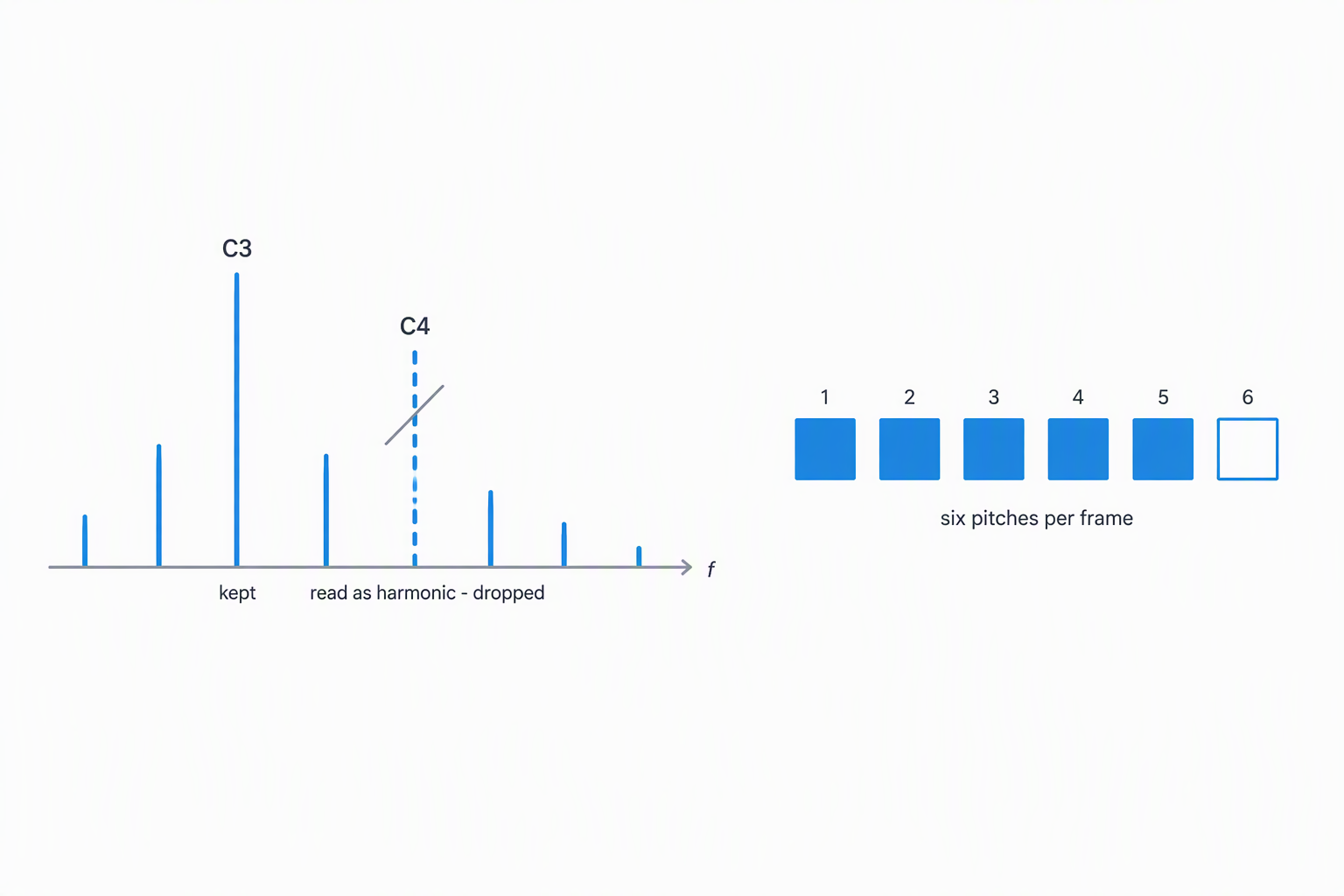
The short answer: six pitches per analysis frame in polyphonic mode — that is the literal ceiling in the analyser, a constant named MAXP set to 6. A frame is 11.6 milliseconds long, so a four-minute track runs through roughly twenty thousand frames, each allowed its own six. One consequence of the same code catches people out: play two notes an octave apart and only one comes back, because the upper one is discarded as a harmonic.
Both figures below come from the analyser that runs this page, not from a marketing page. If you are comparing audio to MIDI conversion software, these are the two questions worth asking of any tool: how many simultaneous pitches does it hold, and does an octave survive.
Six per frame is not six per song
The ceiling applies to a single moment, not to the file. Audio is read in overlapping frames of 256 samples at 22,050 Hz, which works out to 11.610 ms per frame, or about 86 frames per second. Each frame gets its own independent list of pitches, capped at six.
So a four-minute piece is not limited to six notes in total — it can hold hundreds, spread across time. What it cannot do is resolve more than six distinct pitches sounding at the same instant. A seven-note jazz chord loses its top voice. A dense orchestral tutti is far past what six slots can represent, which is why full mixes produce the scattered results people complain about.
This is also why "unlimited polyphony" claims are worth reading carefully. Every analyser has a ceiling somewhere; the useful question is what the number is and what happens to the note that does not fit.
The rule that eats octaves
Before a pitch is accepted, it is checked against the pitches already kept in that frame. The check is a short piece of logic that runs for every candidate:
var r = cand.f / kept[kk2].f;
if (r > 1.8) {
  var n = Math.round(r);
  if (n <= 8 && Math.abs(r - n) < 0.05) { isHarm = true; break; }
}
Read it as three conditions that all have to hold before a pitch is thrown out as someone else's overtone:
- The frequency ratio is above 1.8. Anything below that is never tested, so thirds, fourths, fifths, sixths and minor sevenths are always kept.
- The ratio rounds to a whole number 2 through 8. Only those harmonics are recognised.
- It sits within 5% of that whole number. Equal temperament puts an exact octave at 2.000, so it lands dead centre and always matches.
An octave is ratio 2.0. That clears 1.8, rounds to 2, and misses 2 by nothing at all — so the upper note is classified as the lower note's second harmonic and dropped. A twelfth (3.0) and a double octave (4.0) go the same way.
Which of the two survives depends on loudness, because candidates are processed loudest first. If the lower note is louder, it is admitted first and the upper octave is discarded against it. If the upper note is louder, it is admitted first, and the lower one then arrives at a ratio of 0.5 — below the 1.8 threshold, so it is never tested and both notes stay.
| Interval | Ratio | Above 1.8? | Rounds to 2–8 within 5%? | Outcome |
|---|---|---|---|---|
| Minor third | 1.189 | No | not tested | kept |
| Perfect fifth | 1.498 | No | not tested | kept |
| Minor seventh | 1.782 | No | not tested | kept |
| Major seventh | 1.887 | Yes | rounds to 2, off by 0.113 | kept |
| Octave | 2.000 | Yes | rounds to 2, off by 0.000 | dropped |
| Twelfth | 3.000 | Yes | rounds to 3, off by 0.000 | dropped |
The practical reading: a voicing that doubles a line at the octave comes back thinner than the one you recorded. If you need the octave to survive, record the two notes as separate takes and convert each on its own.
What a pitch has to look like to count at all
Before the harmonic test, a candidate has to clear three gates in the same frame:
- It must be loud enough. The threshold is 3% of the strongest peak in that frame, so anything quieter than a thirtieth of the loudest partial is never considered.
- It must be a genuine local peak. A bin has to exceed its four nearest neighbours on both sides — five bins compared in total. With a bin width of 10.7666 Hz (22,050 divided by a 2,048-point window), that means a pitch has to stand clear of its neighbours across roughly 50 Hz.
- It must fall inside the search window. Polyphonic mode looks between 55 Hz and 4,000 Hz — A1 up to about B7. Monophonic mode searches a narrower band, topping out at 1,800 Hz.
Two pitches that land on the same MIDI note number also collapse into one, so a unison played on two instruments registers once regardless of how many slots are free.
How to check any of this yourself
None of the above needs to be taken on trust. You can reproduce it in a couple of minutes:
- In any synth or DAW, render two sustained notes an octave apart — C3 and C4, equal volume — to a WAV file.
- Convert it here in polyphonic mode and read the exported CSV.
- Count the distinct
note_namevalues. An octave pair should come back as one. - Render the same pair with C4 noticeably louder than C3 and repeat. Both should now appear, because the ratio is tested from whichever note was admitted first.
- For the ceiling, render a seven-note chord and count again: at most six rows share a start time.
If a tool you are evaluating will not let you see the note list, that is worth knowing before you commit to it. Being able to read the raw output is what makes any accuracy claim checkable.
What to look for when choosing conversion software
Put the two numbers from this page next to whatever else you are considering:
- Is the polyphonic ceiling stated? If a page says "polyphonic" without a number, you have no way to predict what a dense chord will do. Six is a real, stated number.
- Do octaves survive? Harmonic suppression is the right thing to do for real overtones — it is what stops a single piano note from coming back as six stacked pitches. The cost is that genuine octave doublings go with them. Any tool doing this has made the same trade.
- Can you see the raw notes? A CSV or piano roll turns a claim into something you can count.
- Where does the analysis run? This one runs in your browser, so nothing is uploaded and there is no queue or file limit to plan around.
Six simultaneous pitches covers most real material: a piano sonata, a vocal line with accompaniment, a bass part with chords. It is not enough for a full mix, and no setting will make it enough — for that the answer is to split the stems first and convert one at a time.
Try the converter on your own file and read the CSV before you judge any of it.
Questions people actually ask
Is there an open source audio to MIDI converter I can use here?
This converter is not delivered as open-source code you download and compile — it is a browser tool you use on the page, with nothing to install. What you can inspect is the output: it exports a CSV of the exact notes it found, with pitch, start, end and velocity to four decimals, so you can audit the result yourself rather than trusting a name. If your real goal is to read or verify the conversion, that note list is the part that matters, and it is fully visible here.
Does audio to MIDI work offline?
The analysis runs in your browser, not on a server, so your audio never leaves the device and nothing is uploaded while it is processed. You need an internet connection only to load the page the first time; after that the conversion itself works with no live connection to any backend. That is different from a service that ships your file away to be processed. To use the result elsewhere, export the .mid it produces and import that into whatever app you are working in.
Related guides
- MP3 to MIDIWhy MP3 loses notes that WAV keeps
- Audio to MIDI pluginWhen to install one, and when the browser is enough
- WAV to MIDIHow to prepare the file before you convert
- Voice to MIDIWhat a single-line converter can follow
- MIDI converterWhat is actually inside a MIDI file
- Audio to MIDI converterHow accurate a conversion really is
- Audio to MIDI freeWhat the top tools actually return
- Audio into MIDIWhere the note boundaries land
- MP3 to MIDI converterHow loud a note has to be before it hits velocity 127