The short answer: every boundary in the file lands on one of two grids. With snapping off it is the analysis frame grid — 11.610 ms, the hop of the analyser that runs on this page. With snapping on it is the beat grid you set, one step of (60 / BPM) × (4 / grid), which is 125.0 ms at the 120 BPM and 1/16 defaults. In our measurements the beat grid moved a note start by up to 61.5 ms and forced every note length to a multiple of 125.0 ms. The mode you pick moves it further: the same 200 ms test note came back as 185.8 ms in monophonic mode and 290.2 ms in polyphonic mode.
Every number on this page was produced by running the actual analyser that powers this site against audio with known answers, plus the demo file that ships with the tool. Nothing here is estimated.
Two grids, one boundary
The analyser reads audio in overlapping windows of 2,048 samples at 22,050 Hz, stepping forward 256 samples at a time. That step is the fine grid: 256 / 22,050 = 11.610 ms, about 86 frames a second. A note start is recorded as the left edge of the first frame that qualified, and a note end as the left edge of the frame after the last one that did, so with snapping off every boundary in the file is an exact multiple of 11.610 ms.
We checked that on the 3.94-second demo file that ships with the converter (22,050 Hz, mono, 16-bit): it returns eight notes, and all eight starts and ends sat exactly on the frame grid — zero off-grid boundaries.
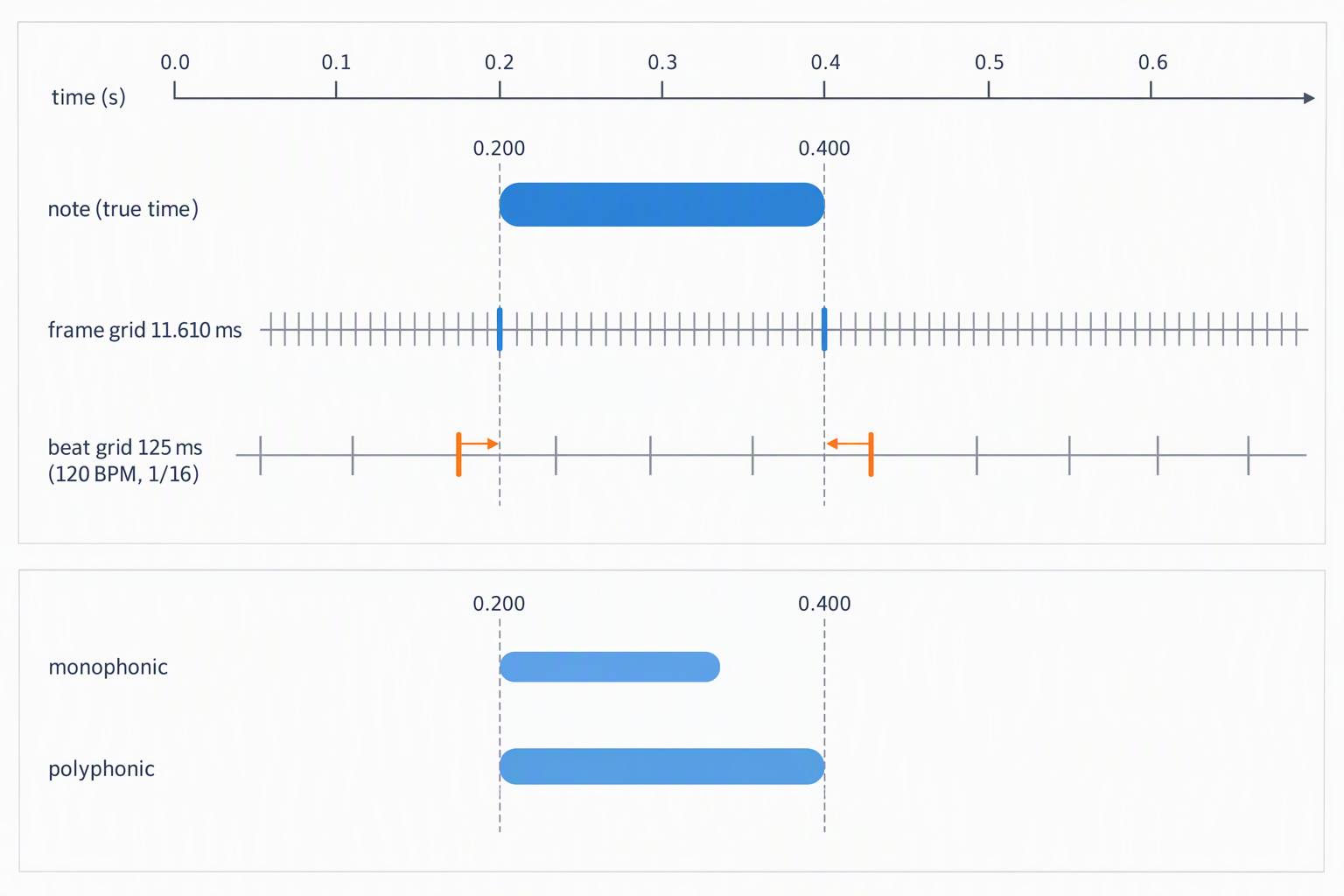
Snapping replaces that grid with the beat grid. The step comes straight from the tempo and grid controls you set:
var stepSec = (60 / p.bpm) * (4 / p.grid);
var s0 = Math.round(notes[n].start / stepSec) * stepSec;
var e0 = Math.round(notes[n].end   / stepSec) * stepSec;
if (e0 <= s0) e0 = s0 + stepSec;
Both ends are rounded to the nearest step, independently. The last line matters: if rounding collapses a note to zero length, the end is pushed one whole step later, so a snapped note is never shorter than one grid step.
| Tempo you set | Grid | Step | Largest move, note start | Largest move, note end |
|---|---|---|---|---|
| 90 BPM | 1/8 | 333.3 ms | 165.9 ms | 157.6 ms |
| 90 BPM | 1/16 | 166.7 ms | 82.0 ms | 78.7 ms |
| 90 BPM | 1/32 | 83.3 ms | 40.2 ms | 39.7 ms |
| 120 BPM | 1/8 | 250.0 ms | 121.5 ms | 123.1 ms |
| 120 BPM | 1/16 (default) | 125.0 ms | 61.5 ms | 60.0 ms |
| 120 BPM | 1/32 | 62.5 ms | 28.6 ms | 25.7 ms |
| 140 BPM | 1/8 | 214.3 ms | 103.5 ms | 102.5 ms |
| 140 BPM | 1/16 | 107.1 ms | 52.7 ms | 53.4 ms |
| 140 BPM | 1/32 | 53.6 ms | 22.4 ms | 26.0 ms |
The rule of thumb is half a step in the worst case, and the step is decided by the tempo you type in — not by the music. Type 90 into a track that runs at 120 and the 1/16 step grows from 125.0 ms to 166.7 ms, and the worst-case movement grows with it from 61.5 ms to 82.0 ms.
What snapping does to note length
Because the two ends are rounded independently, snapping changes note lengths in both directions. Synthetic notes of known length, converted at 120 BPM with a 1/16 grid and the default 60 ms shortest-note setting:
| True length | Measured, snapping off | After snapping | Change |
|---|---|---|---|
| 80 ms | 69.7 ms | 125.0 ms | +55.3 ms |
| 100 ms | 81.3 ms | 125.0 ms | +43.7 ms |
| 125 ms | 104.5 ms | 125.0 ms | +20.5 ms |
| 150 ms | 139.3 ms | 125.0 ms | −14.3 ms |
| 200 ms | 185.8 ms | 250.0 ms | +64.2 ms |
| 250 ms | 232.2 ms | 250.0 ms | +17.8 ms |
| 300 ms | 290.2 ms | 250.0 ms | −40.2 ms |
| 400 ms | 383.1 ms | 375.0 ms | −8.1 ms |
| 500 ms | 487.6 ms | 500.0 ms | +12.4 ms |
On the demo file the same effect is easy to see: raw durations of 267.0, 301.9 and 1195.8 ms became 250.0, 250.0 and 1250.0 ms. Starts moved by 18.0 ms on average and 38.3 ms at worst. The notes covered 83.4% of the file before snapping and 76.1% after — snapping does not merely tidy the timing, it removes a little over seven percent of the sounding time.
That is the trade: after snapping the rhythm is regular and the file drops into a DAW or notation program cleanly, but the durations no longer describe what was played.
The shortest-note control measures your note, not the one you played
The control is a number of milliseconds, but the comparison happens in frames:
var minFrames = Math.max(1, Math.round((p.minms / 1000) / frameT));At the 60 ms default that rounds to five frames, 58.05 ms. Crucially it is compared against the measured span, which as the table above shows is already shorter than the true note. Measured at the default:
- A true 40 ms note: dropped.
- A true 60 ms note: dropped.
- A true 80 ms note: measured at 69.7 ms and kept.
- A true 100 ms note: measured at 81.3 ms and kept.
So the number you type is not the number you get. If short notes are disappearing, step the control down in 10 ms increments and watch the piano roll rather than assuming a particular value corresponds to your playing.
The seam: when two notes come back as one
A silence inside one pitch is bridged rather than split, and the width of that bridge is also expressed in frames:
var gapFrames = Math.max(1, Math.round(0.08 / frameT)); // 7 frames = 81.27 msThat is the nominal figure. What actually happens depends on the mode, because the two modes decide "this frame contains the note" very differently. Two 200 ms C4 notes separated by a swept silence, defaults otherwise, no snapping:
| Mode | Silence | Result | Reported notes |
|---|---|---|---|
| Monophonic | 60 ms | merged into one | 0.1625 – 0.6153 |
| Monophonic | 70 ms | split into two | 0.1625 – 0.3483 and 0.4412 – 0.6269 |
| Monophonic | 120 ms | split into two | 0.1625 – 0.3483 and 0.4876 – 0.6734 |
| Polyphonic | 160 ms | merged into one | 0.1161 – 0.7663 |
| Polyphonic | 200 ms | split into two | 0.1161 – 0.4063 and 0.5224 – 0.8011 |
| Polyphonic | 360 ms | split into two | 0.1161 – 0.4063 and 0.6734 – 0.9636 |
In monophonic mode the split point sits between 60 and 70 ms of true silence — earlier than the nominal 81.27 ms, because the reported note end is already early and that makes the measured gap wider than the real one. In polyphonic mode you need somewhere between 160 and 200 ms of silence before two repeated notes come back as two, roughly three times as much. The bridge width in the source is identical in both modes; what differs is how many frames around the note each mode claims.
Repeated notes are the material that suffers first: strummed eighths, staccato lines, a bass part with short rests. The bridge is not exposed as a control in this tool, so the practical levers are the mode (monophonic splits far more readily) and the material (a cleaner, isolated part gives the analyser real silence to work with).
Monophonic or polyphonic moves the boundary more than anything else
One 200 ms C4 note, synthesised so the true onset and release are known exactly, converted in both modes with everything else at defaults:
| Mode | Reported start | Start vs true | Reported end | End vs true | Reported length |
|---|---|---|---|---|---|
| Monophonic | 0.1625 s | −37.5 ms | 0.3483 s | −51.7 ms | 185.8 ms |
| Polyphonic | 0.1161 s | −83.9 ms | 0.4063 s | +6.3 ms | 290.2 ms |
The same note is 104.4 ms longer in polyphonic mode. The reason is the gate each mode applies before it will say a frame contains music:
- Monophonic requires the frame to clear a loudness gate (the 10th-percentile frame level plus 14% of the way to the loudest frame at the default sensitivity) and a harmonic-comb score above
0.35 − 0.25 × sens— 0.20 at the default sensitivity of 60. Both have to hold, so only frames well inside the note qualify. - Polyphonic accepts any spectral peak above 3% of the loudest peak in that frame. That is a far weaker test, and it fires on frames whose window barely overlaps the note at all.
The window is 2,048 samples — 92.88 ms — while the hop is 11.610 ms, so eight frames overlap any given instant and the earliest of them can begin nearly a full window before the sound does. The reported start is that frame's left edge. That is why a start time is best read as "the left edge of the first window that saw enough of the note", not as the moment the note began.
Where the boundary lands in the file itself
The MIDI writer converts seconds to ticks with Math.round(n.start * 480 * bpm / 60), at 480 ticks per quarter note. At 120 BPM one tick is 1.0417 ms and one 1/16 step is exactly 60 ticks. On the test note above:
- Raw start 0.2902 s → tick 279 — not a multiple of 60.
- Snapped start 0.2500 s → tick 240 — four whole steps in.
- Raw end 0.6618 s → tick 635; snapped end 0.6250 s → tick 600.
If you are exporting to notation, that difference is the whole game: a grid-aligned tick value is what notation programs expect, and an off-grid one is what makes a score come out full of ties and odd rests.
Setting it up for a finished track
- Type the real tempo first. The beat grid is derived from the BPM field, so a wrong tempo changes how far every boundary moves — 61.5 ms worst case at 120 BPM, 82.0 ms at 90.
- Judge pitch with snapping off. Snapping moves starts by up to 61.5 ms at the defaults, which is enough to hide a boundary problem you would otherwise see in the piano roll.
- Use monophonic for a single line. Its boundaries sit closer to the truth (−37.5 ms at the start rather than −83.9 ms) and it separates repeated notes at about a third of the silence polyphonic needs.
- Use polyphonic only where you need chords, and expect note lengths to come out longer than what was played — 290.2 ms against 185.8 ms on the same test note.
- Leave shortest note at 60 ms until something is missing, then step down in 10 ms increments.
- Turn snapping on last, right before export, and re-check the piano roll afterwards.
What we did not measure
Being specific about the limits: we have not run a commercial, full-band master through this and measured the result, so there is no number here for "a finished pop mix with drums, bass and vocals". The measurements above come from the 3.94-second monophonic demo file that ships with the tool and from synthetically generated notes whose true start and end are known exactly. A dense mix behaves differently in one respect we can state without measuring: monophonic mode reports one pitch per frame, so a full mix will not be represented faithfully by it either way.
You can get the equivalent numbers for your own track in about a minute:
- Convert the file with snapping off and export the CSV.
- Open it in a spreadsheet and sort
duration_secascending. On the demo file the shortest note was 267.0 ms; if your shortest is under about 80 ms, you are looking at either very short material or detection artefacts. - Count rows and divide by the length of the file to get notes per second — 2.03 on the demo file. A number far above that on a slow melody means notes are being split.
- Repeat with snapping on and compare the
start_seccolumn row by row. The difference is exactly what the beat grid did to your boundaries.
Questions people actually ask
Why does converted MIDI sound right in the DAW but play wrong?
Boundary placement and pitch are different problems, and a file can get the second one right while failing the first. Notes that start up to 83.9 ms before the real onset (polyphonic mode, measured) still trigger the correct sample, so playback sounds plausible; what you cannot play from is the rhythm, because the lengths are wrong — 290.2 ms where 200 ms was played. This is a recurring complaint on production forums — the MIDI "sounds OK" in the DAW but is described as not playable. Check the duration column of the CSV before you touch a single pitch.
How do I stop two repeated notes from becoming one long note?
Give the analyser a real silence between them, or switch to monophonic mode. Measured split points: monophonic separates two repeated notes once the silence passes roughly 60–70 ms, polyphonic needs roughly 160–200 ms because it claims many more frames around each note. Shortening the shortest-note setting will not help — it drops notes rather than splitting them.
Should I quantize before or after fixing wrong notes?
After. Snapping moves each boundary by up to half a grid step — 61.5 ms at 120 BPM and 1/16 — which is enough to hide the very errors you are looking for, and it makes every length a multiple of 125.0 ms, so you can no longer tell a genuinely short note from a rounded one. Fix pitches and obvious strays with snapping off, then snap as the last step before export.
Do I need to set a BPM to convert audio to MIDI?
No. The converter reads the timing from your audio, so you do not type in a BPM. With quantize off, BPM has no effect on which notes you get — only their start and length, set by the recording. With quantize on, BPM sets the grid the notes snap to, so changing it moves note boundaries to fit that tempo; the note list itself still comes from the audio. Set BPM only when you want the output aligned to a specific grid for your sequencer.
Related guides
- Audio to MIDI converterHow accurate a conversion really is
- MP3 to MIDIWhy MP3 loses notes that WAV keeps
- WAV to MIDIHow to prepare the file before you convert
- Voice to MIDIWhat a single-line converter can follow
- MIDI converterWhat is actually inside a MIDI file
- Audio to MIDI softwareHow many notes it can hold at once
- Audio to MIDI freeWhat the top tools actually return
- MP3 to MIDI converterHow loud a note has to be before it hits velocity 127
- WAV to MIDI converterWhat bit depth actually changes
Run your own file through the converter and read the CSV before you judge any of it.