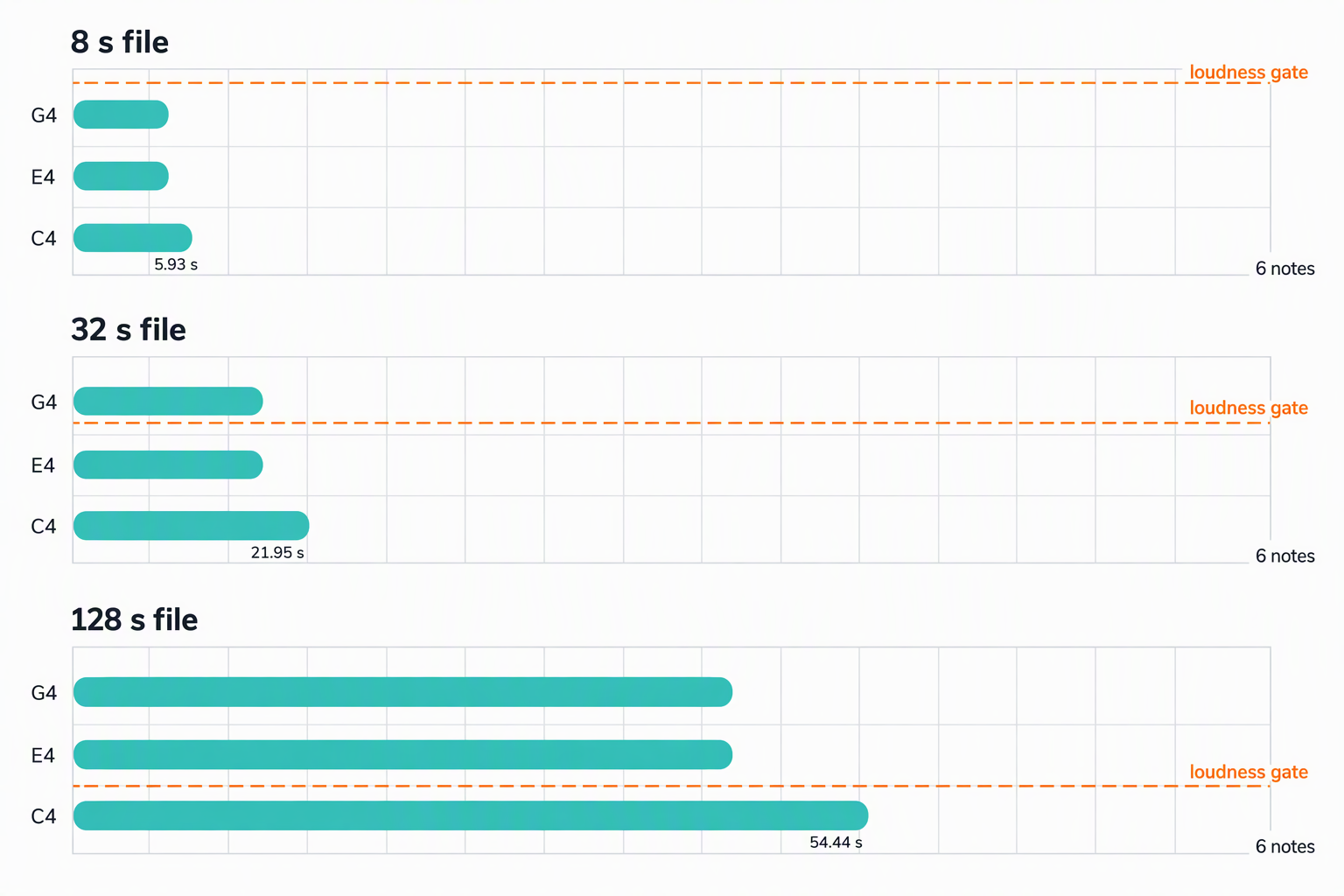
The short answer: this page converts a file, not a link — save the audio out of the video first, then drop that file in. Once it is a file, three things change when you feed a whole soundtrack instead of a short clip, and none of them is the one people expect. The number of notes is set by the music, not by the minutes: one sustained C major chord came back as 6 notes whether the file was 8 seconds long or 128 seconds long. What grows is note length — the longest note went from 5.93 s to 54.44 s across those same files, because the loudness gate is computed over the whole file and a longer file has a quieter bottom tenth. And a section 12 dB louder than the rest, placed 24 seconds later, took a quiet opening from 53 notes to zero. Every number below came out of this site's own analysis code.
First, what this page is and is not
This converter reads an audio file you drop onto the page. It does not fetch anything from a video platform, and there is no field for a link. If the audio you want is inside a video, you have to get the audio out first, and that is only yours to do if you own the recording or have permission to use it. From there on, what you have is an audio file like any other.
No audio from any video platform was used to make this page. Nothing was downloaded, ripped or streamed. Every figure below was produced by synthesising audio whose correct answer we knew in advance, then running this converter's own dsp.js and midi.js over it. That is the only way to publish a number like "6 notes" and be sure it means something. Real songs are messier than what we built, so treat these figures as the behaviour of the mechanism, not as a promise about your file.
This is also not a test of any other product. We measured one implementation — the one running on this site — at its default settings: sensitivity 60, shortest note 60 ms, quantise off, 120 BPM.
How the measurement was built
- Two materials. A sustained chord (C4 + E4 + G4, held for the whole file with a 30 s decay time constant), and an eight-second loop of chord comping, bass and a melody line, repeated 16 times.
- Both synthesised at 48 000 Hz mono, six harmonics per note, 5 ms fades, because that is the rate video containers carry audio at. Everything above 22 050 Hz is resampled on the way in, exactly as it would be for a real export.
- Each file was sliced to several lengths so the material stayed identical and only the length changed.
- Analysis ran on the real code from this site, then the notes were written out with the real MIDI writer.
1. The same chord, three file lengths: only the length of the notes changes
Three pitches held continuously, sliced at 8, 32 and 128 seconds. The note count is the same in all three. Everything else moves.
| File length | Notes | Longest note | Total note time | Gate ÷ loudest frame | Quietest tenth (floor) |
|---|---|---|---|---|---|
| 8 s | 6 | 5.93 s | 18.7 s | 0.791 | 0.18626 |
| 32 s | 6 | 21.95 s | 67.5 s | 0.459 | 0.09122 |
| 128 s | 6 | 54.44 s | 163.7 s | 0.158 | 0.00510 |
The cause is one line of the analysis. Whether a frame counts as a note is decided by a gate placed between the quietest tenth of the file and its loudest frame:
gate = floor + (rmsMax − floor) × 0.14 where floor is the 10th-percentile frame level of that whole file.
A decaying note makes the file's quiet moments quieter the longer the file runs, so the floor drops — from 0.18626 to 0.00510 of full scale across our three files — and the gate follows it down. The chord was still playing at 54 s in the long file and was cut off at 5.93 s in the short one, not because the audio was different, but because the file it sat in was.
In the 32 s file the shape was explicit: three pitches held for 31.9 s came back as three 21.95 s notes starting at 0.00 s, followed by three short 0.56 s notes at 22.27 s, and then nothing at all for the last nine seconds.
The practical reading: a note's length in the MIDI is partly a fact about the file, not only about the performance. If you convert a 20-second excerpt and then the whole three-minute video, the same held chord will not come out the same length twice.
2. How many notes a busy mix produces: minutes multiply, they do not add
Now the other material — the eight-second loop with chord comping, bass and a melody. Here the note count tracks the music, and length simply multiplies it.
| File length | Frames | Notes | Distinct pitches | Median note | Longest note | Total note time | Notes / s | MIDI bytes |
|---|---|---|---|---|---|---|---|---|
| 8 s | 682 | 85 | 26 | 348 ms | 0.85 s | 34.9 s | 10.63 | 759 |
| 16 s | 1 371 | 172 | 26 | 337 ms | 0.85 s | 69.9 s | 10.75 | 1 482 |
| 32 s | 2 749 | 345 | 26 | 325 ms | 0.85 s | 139.8 s | 10.78 | 2 920 |
| 64 s | 5 505 | 720 | 27 | 325 ms | 0.85 s | 275.4 s | 11.25 | 6 025 |
| 128 s | 11 017 | 1 428 | 27 | 325 ms | 0.85 s | 547.8 s | 11.16 | 11 893 |
Notes per second barely moves — 10.63 to 11.16 — so length is close to a straight multiplier. Sixteen times the audio gave 16.8 times the notes. Splitting the 128 s result into its sixteen 8-second blocks makes the point precisely:
93 89 86 91 92 94 93 93 92 92 86 83 86 86 87 85 — mean 89.3, spread 83 to 94.
The converter re-derives the same passage every time and has no memory that it has already heard this chorus twice. There is no song structure in the output: no verse, no chorus, no repeat marks, sixteen near-identical blocks of about 89 notes.
Two more things fall out of that table. The 128 s file produced 547.8 seconds of notes inside 128 seconds of audio, which is about 4.3 voices sounding at once on average — that is what "a full mix" looks like as MIDI. And the file itself is small: 11 893 bytes for 1 428 notes, or 8.33 bytes per note, against a 53-byte empty MIDI file. The CSV export of the same kind of material ran 37.5 bytes per note, roughly four and a half times the size of the MIDI, which is why the CSV is the better thing to open in a spreadsheet and the MIDI the better thing to drop into a DAW.
On this same dense material, monophonic mode returned zero notes at every length — 8 s, 32 s and 128 s alike. Single-line mode needs one harmonic series to lock onto, and three pitches at once do not provide one. A solo line, by contrast, behaved exactly as you would hope: a single melodic part came back at 2.00 notes per second at both 8 s and 128 s, with a longest note of 0.36 s in monophonic mode and 0.41 s in polyphonic mode. Solo line in, usable melody out, at any length.
3. One loud section can empty the quiet ones
This is the failure that surprises people most, and it is a direct consequence of the gate being computed over the entire file. We took a 32-second file with a quiet chord pattern throughout and raised the level of only the last eight seconds.
| Tail raised by | Notes 0–8 s | Notes 8–24 s | Notes 24–32 s | Total |
|---|---|---|---|---|
| 0 dB | 53 | 100 | 46 | 199 |
| 8 dB | 53 | 100 | 3 | 156 |
| 10 dB | 48 | 98 | 3 | 149 |
| 11 dB | 21 | 47 | 3 | 71 |
| 12 dB | 0 | 5 | 3 | 8 |
| 14 dB | 0 | 4 | 3 | 7 |
| 16 dB | 0 | 6 | 3 | 9 |
Two things happen at once, and they pull in opposite directions. The loud section stops being cut up: its own 46 notes, 16.1 s of note time and a longest note of 0.37 s, became 3 notes — G3, D4 and B3 — with 11.9 s of note time and a longest note of 3.96 s, because more of its frames now clear the gate and merge into one another. At the same time the gate rises for the whole file, so the quiet opening is the one that pays: 53 notes at 10 dB, 21 at 11 dB, and none at all at 12 dB.
A video soundtrack is exactly the shape that triggers this: a quiet intro, a loud chorus two minutes later, a quiet bridge. Converting the whole thing at once means the loud part decides the threshold for the quiet parts. Converting the quiet intro on its own gives it its own gate, and its notes survive.
What to do with a video, given all that
- Get the audio out first, from a recording you own or are licensed to use, and save it as WAV or a high-bitrate MP3. This converter takes the file; it does not take a link.
- Cut it before you convert it. Ten to twenty seconds of the part you actually want beats the whole soundtrack. Our loop gave about 89 notes per 8 seconds, so a three-minute video is well over a thousand notes of mostly repeated material.
- Convert quiet and loud sections separately if the level changes a lot. The gate is set once, per file, by the loudest frame in it.
- Use monophonic mode for a melody, polyphonic for chords. On a dense mix, monophonic mode returned nothing at all; on a single line it returned the same 2 notes per second at every length.
- Read the CSV before you judge it. Sort by
duration_secdescending. If the longest note is longer than the longest phrase you played, you are looking at merged material, not a performance. - Leave the shortest-note setting alone unless you mean it. On our 128 s mix, raising it from 60 ms to 250 ms removed 310 notes, to 500 ms removed 1 163, and at 1 000 ms it removed every note in the file — nothing we detected was that long.
One detail worth knowing if you are deciding how much to convert in one go: the analysis reads 86.13 frames per second, so a five-minute soundtrack is 25 832 frames and a ten-minute one is 51 672, processed in blocks of 300. Cost is linear in length. Mess is also linear in length, which is the reason to cut first.
Questions people actually ask
Can I paste a video link into this converter?
No. This page takes an audio file from your machine and analyses it in your browser; nothing is fetched from anywhere. If the music you want is inside a video, extract the audio yourself first, and only from a recording you own or have written permission to use. After that it is an ordinary audio file, and everything on this page applies to it.
Why does a short clip give me a melody but the whole video gives me thousands of notes?
Because the converter reports what it hears, not what the song means. On our test loop the rate was steady at 10.6 to 11.2 notes per second, so length multiplies: 85 notes for 8 seconds, 1 428 for 128. Split into blocks, each 8-second block returned between 83 and 94 notes — the sixteenth repeat was transcribed from scratch, exactly like the first. Nothing in the output marks a repeat, so the only way to get a melody-sized result is to convert a melody-sized piece of audio.
Why did the quiet intro disappear when I converted the whole thing?
The level gate is computed once, over the whole file: it sits between the quietest tenth of the file and its loudest frame. Anything louder, anywhere in the file, raises the bar for everything. In our 32-second test, raising only the last eight seconds by 12 dB took the quiet opening from 53 notes to zero, and the total from 199 notes to 8. Convert the quiet section on its own and it gets its own gate.
How many notes should I expect from a five-minute video?
We have not run a real five-minute video soundtrack, so we will not put a number on it. What we can tell you is the two quantities it depends on: the file is read at 86.13 frames per second, so five minutes is 25 832 frames; and the note rate is set by your material, which measured 89 notes per 8 seconds on a busy loop and 2 notes per second on a single line. Convert ten seconds, count the notes, and multiply — that is a measurement of your file rather than a guess about it.
Does the MIDI need cleaning up before it is playable?
People say this about converted MIDI on production forums, and in our measurements the underlying complaint is real: "NeuralNote creates MIDI that has to be cleaned up to be playable." (KVR Audio forum, thread 609327, April 2024.) The reason on this converter is structural rather than sloppiness: notes are grouped per pitch and only split when a gap of about 81 ms appears, so repeated material merges, and a full mix averages several simultaneous voices. Open the CSV, sort by duration, and the merged notes are the ones at the top.
Related guides
- Where the note boundaries land — the frame grid and the beat grid, measured.
- How many notes a converter can hold at once — the polyphony ceiling and the harmonic rule.
- How to prepare the file before you convert — sample rate, channels and the noise floor.
- What a bend does to your notes — measured bends, slides and vibrato.
- What is actually inside a MIDI file — the bytes, offset by offset.
- MP3 to MIDI — Why MP3 loses notes that WAV keeps
- OGG to MIDI — What the container actually changes (and what it doesn't)
- MP4 to MIDI — Why the AAC audio, not the video, decides your notes
- Convert audio to MIDI — What happens to a stereo file first
Every number on this page can be checked on your own machine: convert a file, export the CSV, and read the duration column against the tables above.