The short answer: a Reaper region shorter than about 200 ms comes back empty because this converter spends its first 2048-sample analysis window — 92.88 ms — before the frame grid even starts, and the default shortest-note setting still demands five consecutive 11.610 ms frames that pass the loudness and harmonic gates. We ran this site's real detector on one known-answer C4 and cut the region shorter and shorter: 150 ms produced 5 frames, only 4 of them usable, and zero notes; 155 ms produced 6 frames, 5 usable, and one C4. A finer sweep puts the knife edge at 155 ms, but that is a one-frame margin, so treat 200 ms as the practical floor. A tight region also sets its own noise floor high: padding the same 150 ms note with half a second of silence in the export dropped the loudness gate from 0.309651 to 0.044974 and brought the note back at velocity 108. Sensitivity did not rescue a short region at any setting from 0 to 100; lowering shortest-note did, at the cost of an 11.61 ms stunted note and extra ghost objects on noisy material. The fix is at export, not in the controls: bounce the whole phrase with room around it, drop the file on the converter, and take the .mid and .csv. Everything runs in your browser, with no upload and nothing to install.
1. Should you convert here, install something, or stay in Reaper?
Before the numbers, the honest decision. Three situations and three different answers, each pinned to a value we measured on this converter rather than to an opinion about a host application.
Convert it right here. You have one clean line, you want its pitches as editable notes, and you can give the region some air. An eight-note phrase of 140 ms notes with 12 ms gaps — 1.216 s in total — returned 8 of 8 pitches in both modes, while a single isolated 140 ms hit returned 0. Export the phrase, not the individual hits. This is the case the measurements below are about.
Go install a plugin, or use the built-in capture in the DAW. You need pitch bend, per-note expression, or note-by-note corrections of a performance. Our 200 ms export is a 61-byte file with 0 pitch-bend events, 0 program-change events and 1 channel; a glide or a vibrato simply has no place to land (what pitch bend detection adds sets out the gap, and when a plugin is worth installing covers the trade). Walking away is the right call here, and saying otherwise would waste your time.
Reaper is not optional. You need separate parts, multiple channels, drums, or a chosen instrument sound. The same 61-byte export is format 1 with 2 tracks but only 1 note channel, and the analyser sums stereo to mono before it measures anything. No export setting will turn one audio file into stems; do the separation in the DAW, then bring each isolated line back here. why the converter cannot pull out just one voice and what drum transcription actually catches describe those walls in numbers.
Everything after this section assumes you are in the first case. That is the one where a browser converter is genuinely the fastest path.
2. The route, in three sentences
Export the region from Reaper as one WAV file. Drop it on this converter, download the .mid and the .csv, and drag the .mid back into your Reaper project. That is the whole workflow; the rest of this page is about the one export choice — how tightly you trim the region — that decides whether any notes come back at all.
3. What we measured, and how
Every number below comes from running this site's real dsp.js and midi.js in Node on synthesised tones whose correct answer we already knew. No third-party tool was measured, and no figure is estimated. The reference tone is one C4 (261.63 Hz, mild harmonic series, 10 ms ramps), rendered at 22 050 Hz and trimmed to the listed region length. Unless stated: sensitivity 60, shortest note 60 ms, 120 BPM, quantize off, polyphonic mode; monophonic mode is reported alongside it because the two fail differently.
The analysis grid is fixed by the converter, not by your Reaper project: audio is resampled to 22 050 Hz, read with a 2048-point FFT stepped 256 samples at a time, so one frame is 11.610 ms (86.13 frames per second) and one bin is 10.7666 Hz. Monophonic search runs 55–1800 Hz; polyphonic peaks are read up to 4000 Hz with at most 6 peaks per frame. Your project's 48 kHz session does not enter that arithmetic — we also fed the same 200 ms region at 44 100 Hz and got the same 10 frames and the same single C4, consistent with the sample-rate test on a full melody.
4. Region length: where the notes actually start
We cut a single C4 to nineteen region lengths and counted the analysis frames and the returned notes. This is a finer sweep than our four-DAW export overview, which tested 40/60/80/100/120/150/200/300/500 ms and reported the first surviving note at 200 ms. The tighter spacing finds the real edge.
| Region length | Frames | Mono notes | Poly notes | What came back |
|---|---|---|---|---|
| 40 ms | 1 | 0 | 0 | nothing |
| 60 ms | 1 | 0 | 0 | nothing |
| 80 ms | 1 | 0 | 0 | nothing |
| 90 ms | 1 | 0 | 0 | nothing |
| 100 ms | 1 | 0 | 0 | nothing |
| 120 ms | 3 | 0 | 0 | nothing |
| 140 ms | 5 | 0 | 0 | nothing |
| 150 ms | 5 | 0 | 0 | nothing |
| 155 ms | 6 | 1 | 1 | C4, 0.0116–0.0697 s, velocity 113 |
| 160 ms | 6 | 1 | 1 | C4, 0.0116–0.0697 s |
| 180 ms | 8 | 1 | 1 | C4, 0.0116–0.0929 s |
| 200 ms | 10 | 1 | 1 | C4, 0.0116–0.1045 s |
| 250 ms | 14 | 1 | 1 | C4, 0.0116–0.1509 s |
| 300 ms | 18 | 1 | 2 | mono C4; poly splits into two C4 objects |
| 500 ms | 36 | 1 | 1 | C4, one clean note |
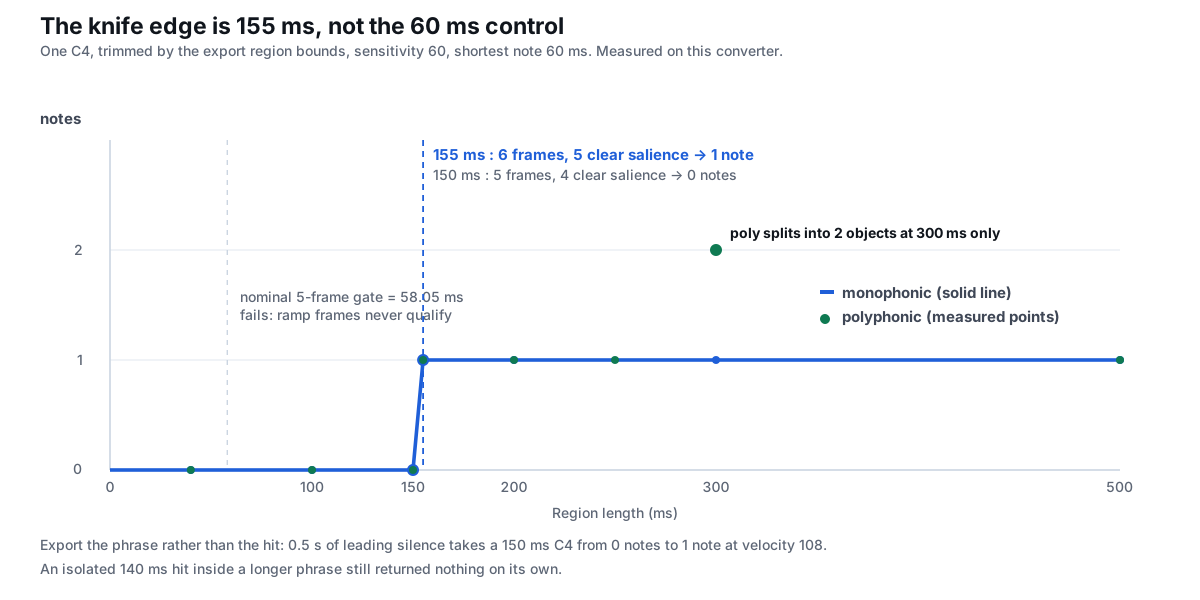
At 5 ms steps the transition is sharp: 150 ms → 0 notes, 152 ms → 0 notes, 155 ms → 1 note, and every length from 155 to 230 ms returns exactly one C4. The pitch is correct at every surviving length, in both modes, at velocity 113. Two cautions about reading this as "155 ms is enough": the win at 155 ms rests on a single extra frame, and at 300 ms polyphonic mode already fragments one sustained tone into two C4 objects (0.0116–0.0697 s and 0.1509–0.2090 s). Give the region real room instead of aiming for the edge.
5. The 92.88 ms tax, and why the 60 ms control does not mean 60 ms
The shortest-note box reads 60 ms, so a 100 ms or 150 ms region looks comfortably above it. It is not, for two separate reasons that both fall out of the engine's constants.
First, the window is a fixed tax. A frame needs 2048 samples at 22 050 Hz — 92.8798 ms — before it can be formed at all. Frames can then start every 256 samples (11.610 ms), so the number of frames in a region of N samples is floor((N − 2048) / 256) + 1. A 100 ms region is 2205 samples and yields 1 frame. A 150 ms region is 3308 samples and yields 5 frames. A 200 ms region is 4410 samples and yields 10 frames. Clips shorter than the window are padded to 2048 samples and still yield only one frame.
Second, the gate is five frames, not sixty milliseconds. The code turns the shortest-note value into a frame count: round((minms/1000) / (256/22050)), which for 60 ms is 5 frames = 58.05 ms. A candidate note must span at least that many consecutive frames that pass both the loudness gate and the harmonic-salience gate. At 150 ms there are exactly 5 frames, but only 4 of them pass: the ramp frames at the ends of a hard-trimmed region do not carry a stable spectrum. Four is less than five, so the note is discarded whole. At 155 ms a sixth frame appears and five survive, which is precisely why the first note appears there.
| Region | Frames | ≥ gate | ≥ salience | Needed | Notes |
|---|---|---|---|---|---|
| 60 ms | 1 | 1 | 0 | 5 | 0 |
| 100 ms | 1 | 1 | 1 | 5 | 0 |
| 150 ms | 5 | 4 | 4 | 5 | 0 |
| 152 ms | 6 | 4 | 4 | 5 | 0 |
| 155 ms | 6 | 5 | 5 | 5 | 1 |
| 180 ms | 8 | 7 | 7 | 5 | 1 |
| 200 ms | 10 | 8 | 8 | 5 | 1 |
| 300 ms | 18 | 10 | 10 | 5 | 1–2 |
| 500 ms | 36 | 22 | 22 | 5 | 1 |
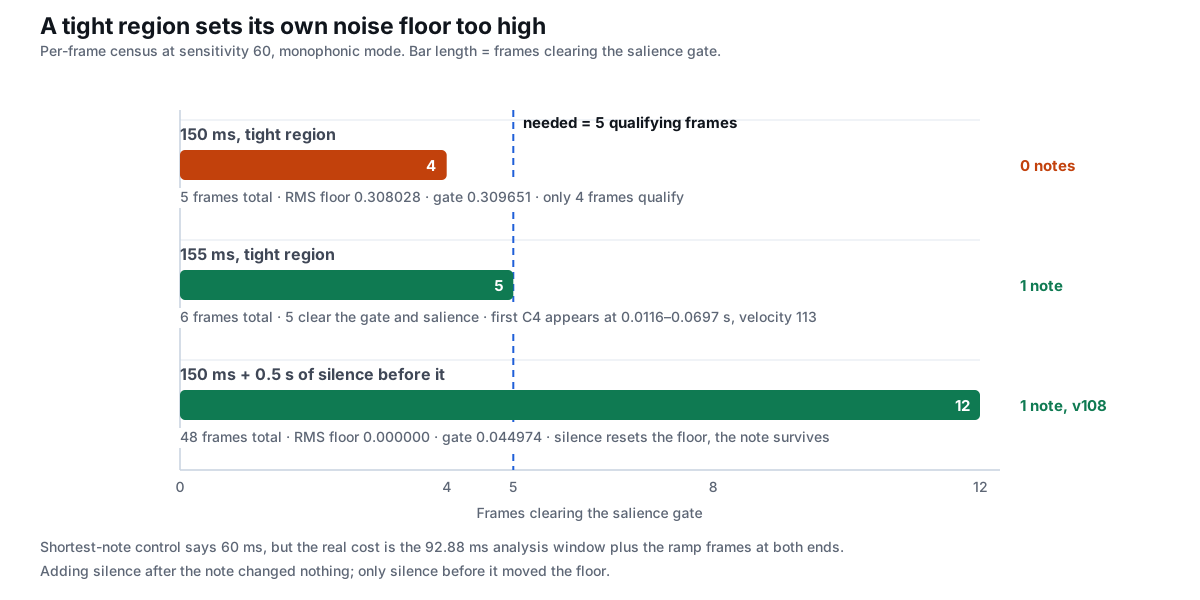
Notice that a longer region does not produce proportionally more usable frames: the gates are computed from the whole file's own RMS distribution, so the 10th-percentile floor rises with the amount of steady tone in the clip. At 500 ms, 22 of 36 frames clear both gates and the reported note starts at 0.1625 s — the reported onset is a detection boundary, not the audible attack. For exact seconds rather than ticks, the CSV note list is the closer record of what the analyser saw.
6. The padding effect: a tight region sets its own noise floor high
Here is the part that is easy to miss. The loudness gate is not an absolute volume threshold; it is floor + (rmsMax − floor) × (0.32 − 0.30 × sens), where floor is the 10th percentile of RMS across this file's frames. In a tight 150 ms region almost every frame is loud tone, so the "quiet" percentile is nearly as loud as the peak. We measured both cases:
| Export shape | Frames | RMS floor | Gate | Frames ≥ gate | Notes | Returned note |
|---|---|---|---|---|---|---|
| Tight 150 ms | 5 | 0.308028 | 0.309651 | 4 | 0 | none |
| 0.5 s silence before | 48 | 0.000000 | 0.044974 | 12 | 1 | C4, v108 |
| 0.5 s before + 0.5 s after | 92 | 0.000000 | 0.044974 | 20 | 1 | C4, v107 |
| 2 s before + 2 s after | 350 | 0.000000 | 0.044379 | 20 | 1 | C4, v108 |
Padding the export drops the floor to zero and the gate from 0.309651 to 0.044974, so the note's ramp frames now count and the same 150 ms tone survives. This is why the practical advice is "leave room around the note" rather than "make the note itself longer": adding silence changes the statistics the detector uses. It is not free, though. In the padded case the note came back at velocity 108 instead of 113 (the averaged RMS now includes quieter frames), and its reported start was 0.4180 s in a file where the tone begins at 0.5000 s — about 82 ms early. Timing offsets from padded exports are their own subject; here the point is only that padding converts zero notes into one. If bar positions matter, export a tight region that still clears 200 ms, and use the CSV seconds as your reference rather than assuming the MIDI grid equals your project grid.
7. Can the controls rescue a short region?
Two sliders look like they should help. Only one does, and it is the one you should be more careful with.
Sensitivity: no
We swept sensitivity from 0 to 100 on four region lengths. At 100 ms and 150 ms every setting returned zero notes in both modes. Sensitivity changes the gate interpolation and the harmonic-salience threshold (0.35 − 0.25 × sens), but it cannot create frames that the 2048-sample window never produced, and it cannot lower the five-frame minimum. At 180 and 200 ms the polyphonic result survived even at sensitivity 0, while monophonic mode needed sensitivity 40 or above; that is a mode difference, explained by what each detection mode scores, not a repair for a short region.
| Region | sens 0 | 20 | 40 | 60 | 80 | 100 |
|---|---|---|---|---|---|---|
| 100 ms | 0 / 0 | 0 / 0 | 0 / 0 | 0 / 0 | 0 / 0 | 0 / 0 |
| 150 ms | 0 / 0 | 0 / 0 | 0 / 0 | 0 / 0 | 0 / 0 | 0 / 0 |
| 180 ms | 0 / 1 | 0 / 1 | 1 / 1 | 1 / 1 | 1 / 1 | 1 / 1 |
| 200 ms | 0 / 1 | 0 / 1 | 1 / 1 | 1 / 1 | 1 / 1 | 1 / 1 |
Shortest note: yes, but it changes what a note is
Lowering shortest-note reduces the frame minimum directly. On a 150 ms region, minms 0/10 (1 frame), 20 (2 frames), 30 and 40 (3 frames) all returned one C4; minms 60 (5 frames) and above returned none. On a 100 ms region only minms 0/10 returned anything. What you get is not the original note: the 100 ms case at minms 0 is a single 11.61 ms frame, 0.0000–0.0116 s; the 150 ms case at minms 20 is 0.0116–0.0580 s (46.44 ms). Both are far shorter than the tone actually played.
| Region | minms | Frame minimum | Notes | Note span |
|---|---|---|---|---|
| 100 ms | 0 | 1 | 1 | 0.0000–0.0116 s |
| 100 ms | 20 | 2 | 0 | none |
| 150 ms | 20 | 2 | 1 | 0.0116–0.0580 s |
| 150 ms | 60 | 5 | 0 | none |
| 200 ms | 0 / 20 / 60 | 1 / 2 / 5 | 1 / 1 / 1 | 0.0116–0.1045 s |
| 200 ms | 100 | 9 | 0 | none |
There is also a cost on real material. We added deterministic low-level noise to a 300 ms C4 and compared minms 0 with minms 60: with noise amplitude 0.010 and 0.020 the low-minimum setting returned 2 note objects while the default returned 1, because a one-frame minimum lets isolated noisy frames become notes. So the honest order is: fix the export first, then adjust the controls. The four-step troubleshooting order starts with format and mode for exactly this reason, and the cleanup passes are what you do if a low minimum has already let ghost notes into the file.
8. Export the phrase, not the hit
The most useful result of this measurement is also the simplest workaround. A single 140 ms note exported alone returns nothing, but a phrase of eight such notes returns all of them, because the analyser's gates and percentiles are computed over the whole file and each pitch group accumulates enough frames.
| Export | Mono | Poly | Pitches returned |
|---|---|---|---|
| Eight distinct pitches (C4 D4 E4 G4 A4 B4 C5 D5) | 8 | 8 | 60,62,64,67,69,71,72,74 |
| Eight pitches with one repeated pair (C4 D4 E4 G4 G4 E4 D4 C4) | 7 | 7 | 60,62,64,67,64,62,60 |
| One isolated 140 ms hit | 0 | 0 | none |
| Two 200 ms notes in one 400 ms export | 2 | 2 | 60,64 |
All eight notes in the distinct-pitch phrase came back at velocity 112 with onsets 0.0000, 0.1393, 0.2902, 0.4528, 0.6037, 0.7546, 0.9056 and 1.0681 s. The repeated-pitch phrase returned seven because two adjacent G4s were bridged: the detector joins same-pitch groups across gaps up to 7 frames ≈ 81 ms, so a 12 ms gap between identical notes becomes one longer note (0.4528–0.6734 s). Two 200 ms notes in one 400 ms export returned both pitches, while each 200 ms note exported on its own returned only its own single note — extra proof that a longer region is not a compromise, it is the safer container. If you do need per-hit files, the one-at-a-time workflow explains why there is no folder-drop button here.
9. What you actually receive for a short region
An empty conversion is not an error message; it is a valid, empty Standard MIDI file. We parsed the exports back to confirm the bytes, so you can tell the two cases apart by the file itself:
| Region | .mid bytes | note-on / off | Meta events | CSV bytes | CSV rows |
|---|---|---|---|---|---|
| 150 ms | 53 | 0 / 0 | FF51 ×1, FF58 ×1, FF2F ×2 | 65 | header only |
| 200 ms | 61 | 1 / 1 | FF51 ×1, FF58 ×1, FF2F ×2 | 98 | 1,60,C4,0.0116,0.1045,0.0929,113 |
| 300 ms | 69 | 2 / 2 | FF51 ×1, FF58 ×1, FF2F ×2 | 131 | two C4 rows (fragmented) |
All three are format 1, 2 tracks, 480 ticks per quarter note, one channel, with 0 program-change and 0 pitch-bend events. The 53-byte empty file is the same skeleton a zero-note MIDI file always has; the difference between "the converter found nothing" and "the converter found one note" is exactly 8 bytes and one note-on/note-off pair. The CSV is often the faster check: a 65-byte header-only file tells you immediately that the region was too short, and how big these files can get explains why size tracks note count rather than audio length.
10. Region export checklist
- Set the region bounds with room, not tight to the attack. 150 ms returned 0 notes; 155 ms is a knife edge; 200 ms is the practical floor. Leave a couple of hundred milliseconds at both ends.
- Bounce the whole phrase. Eight 140 ms notes in one 1.216 s export returned 8 of 8 pitches; one of those notes exported alone returned 0.
- Do not reach for sensitivity first. At 100 and 150 ms, all six sensitivity settings from 0 to 100 returned 0 notes.
- Keep shortest-note at its default while exporting. Lowering it can manufacture an 11.61 ms note and lets noisy frames through; fix the file, then the control.
- Check the CSV before the piano roll. A 65-byte header-only CSV means no notes were accepted — re-export with a longer region rather than tuning sliders.
- Export WAV if the format is in doubt. The browser decodes to samples before any of this happens; how to prepare that file covers the input side, and the region arithmetic above is unchanged by sample rate.
For the other export settings people worry about — level, stereo panning, leading silence and fades — the four-DAW export overview measures each one separately. The region length is the only one that deletes notes outright.
What Reaper has built in (context only, not our measurements)
Reaper ships a selection-based pitch-to-MIDI action, so there is a route that never leaves the project. That is a menu-level fact about the application, not a number from this site, and it is not what this page tests. The reason an exported file is still worth discussing is simpler: an audio file is the one artifact any host can hand to this page, and an SMF .mid is the one artifact any host can take back. For the hosts where we walked the import path separately, see FL Studio, Ableton Live and Logic Pro. If your goal is per-note expression rather than a note list, stay in the DAW: our 61-byte export has nowhere to store it.
Questions people actually ask
Does Reaper have audio to MIDI?
Reaper has its own conversion, but the failure most people meet is the export region, not the feature: a region of 150 ms or less returns 0 notes here, and 155 ms is the exact knife edge where the first C4 appears (6 analyser frames, 5 of them clearing the salience gate). The nominal shortest-note gate is 5 frames = 58.05 ms, yet it cannot rescue a 150 ms region because the first and last ramp frames never qualify. Export the phrase with room around it instead of trimming to the hit: 0.5 s of leading silence alone takes a 150 ms C4 from 0 notes to 1 note at velocity 108. Turning the export level down is a different question entirely, with its own measured answer.
Why did my Reaper region convert to an empty MIDI file?
Check the region length first. On this detector a single C4 trimmed to 40, 60, 80, 90, 100, 120, 140 or 150 ms returned 0 notes in both modes, and the first note appeared at 155 ms. The 2048-sample window costs 92.88 ms before frames can be counted, and the default shortest-note setting needs 5 consecutive usable frames. Export the phrase with room around it.
The shortest-note control says 60 ms. Why is a 60 ms region not enough?
60 ms is converted into a frame count, not used as a duration in milliseconds: round(0.060 / 0.011610) = 5 frames. A 60 ms region yields only 1 frame, because the analysis window itself is 92.88 ms long. Five frames need roughly 150–160 ms of audio, and the ramp frames at both ends still have to clear the loudness and salience gates, which is why the reliable edge is 155 ms and the comfortable one is 200 ms.
Will raising sensitivity bring the notes back?
No. We swept sensitivity 0, 20, 40, 60, 80 and 100 on 100 ms and 150 ms regions: every setting produced 0 notes in monophonic and polyphonic mode. Sensitivity moves the loudness and harmonic thresholds, but it cannot create analysis frames or lower the five-frame minimum.
Should I lower shortest-note instead?
It works technically, at a cost. On a 150 ms region, minms 0–40 returned one C4 that spans only 0.0116–0.0580 s, far shorter than the tone played; on a 100 ms region minms 0 produced a single 11.61 ms frame. On a noisy 300 ms clip the same setting returned 2 note objects where the default returned 1. Prefer a longer export over a lower gate.
Does leaving silence around the note help or hurt?
For note recovery it helps. The loudness gate is derived from the 10th percentile of RMS in the whole file: a tight 150 ms region had a gate of 0.309651 and 0 notes, while the same tone with 0.5 s of silence before it had a gate of 0.044974 and 1 note. It does change the reported numbers — velocity fell from 113 to 108 and the onset came back about 82 ms early — so use silence for recovery, not for bar-accurate timing.
Does exporting at 48 kHz instead of 44.1 kHz fix short regions?
No. The detector resamples to a fixed 22 050 Hz working rate with a fixed 2048-sample window. We fed a 200 ms region at 44 100 Hz and got the same 10 frames and the same single C4 as the 22 050 Hz version; the full sample-rate comparison reaches the same conclusion on a melody. The region length is the variable that matters.
Why did one sustained note turn into two notes?
Polyphonic mode groups frames by pitch and splits them when a gap exceeds 7 frames (≈ 81 ms). At 300 ms our single C4 came back as two C4 objects spanning 0.0116–0.0697 s and 0.1509–0.2090 s, because a few middle frames fell below the gate. Monophonic mode returned one note for the same clip. Deleting overlap and ghost notes is the first pass of cleanup for exactly this shape.
Can I convert each hit as its own file and stitch them together?
You can, but each file will need its own room: a single isolated 140 ms hit returned 0 notes, while the same note inside a 1.216 s eight-note phrase was detected correctly. Per-hit exports also mean per-file settings and downloads — batch converting several files describes that workflow. Bouncing the phrase once is both faster and more reliable.
Convert a file now — runs in your browser, nothing is uploaded.
Related guides
- Other DAWs audio to MIDIWhich export settings change the notes: length, level, channels, silence, fades
- Fix dropped notesThe order to fix it: format, mode, sensitivity, shortest note
- Mono vs polyWhy the two modes fail differently on the same clip
- Audio to notesThe 7-column CSV and the exact seconds behind every onset
- MIDI file sizeWhy a 53-byte empty file and a 61-byte one-note file differ by 8 bytes
- Clean up a converted MIDIThe passes that remove ghost notes and split objects
- Sample rate & MIDIWhy 44.1k, 48k and 22.05k return the same note list
- WAV to MIDIHow to prepare the file before you convert
- MIDI editorWhat the browser controls can and cannot change after conversion
- Batch convert audioWhy there is no folder-drop button, and what one file at a time costs