The short answer: no — turning the bounce level down in Cubase does not delete a single note, because every threshold this converter applies is a ratio, not a volume. We took one four-note phrase (C4 D4 E4 G4) and scaled it in fine steps: at −40 dB it returned 4 of 4 notes at velocity 39, at −50 dB, 4 of 4 at velocity 20, and even at −140 dB it still returned the same four pitches in both modes, with velocity clamped to its floor of 1. What level changes is loudness, not pitch: the only line in the whole pipeline that reads absolute amplitude is the velocity formula, and in the exported file that difference is exactly 8 bytes out of 89. Notes do eventually start dropping, but not because of the fader — they drop when a real fixed-point bounce runs out of bits. On a 16-bit export the four notes stay clean down to −57 dB and first break at −58 dB; monophonic mode reaches zero notes by −70 dB, while a 24-bit export held all four at −80 dB. So do not re-bounce to chase level: convert the quiet file here, then fix velocity in Cubase; if the part is very quiet, export 24-bit instead of 16-bit. Everything runs in your browser — no upload, no account, nothing to install.
1. Should you convert here, install something, or stay in Cubase?
Before the numbers, the honest decision. Three situations, three answers, each pinned to a value we measured on this converter rather than to an opinion about a host application.
Convert it right here. You have one clean line and you want its pitches as editable notes. Level is not a reason to re-record: a 16-bit bounce all the way down to −57 dB returned 4 of 4 notes, and at 24-bit the same four notes survived at −80 dB. Export the phrase, drop the file on the converter, and take the .mid and .csv. You will fix the velocity afterwards, not the pitches.
Go install a plugin, or use the built-in capture in the DAW. You need pitch bend, per-note expression, or note-by-note correction of a performance. Our four-note export is an 89-byte file with 0 pitch-bend events, 0 program-change events and 1 note channel; a glide or a vibrato has nowhere to land (what pitch bend detection adds sets out the gap, and when a plugin is worth installing covers the trade). Walking away is the right call here, and saying otherwise would waste your time.
Cubase is not optional. You need separate parts, multiple channels, drums, or a chosen instrument sound. The same file is format 1 with 2 tracks but only 1 note channel, and the analyser sums stereo to mono before it measures anything, so two parts on left and right come back as one merged list. No export level will turn one audio file into stems; do the separation in the DAW, then bring each isolated line back here. Why the converter cannot pull out just one voice and what drum transcription actually catches describe those walls in numbers.
Everything after this section assumes you are in the first case. That is the one where a browser converter is genuinely the fastest path.
2. The route, in three sentences
Export the region from Cubase as one audio file, at any sensible level and preferably 24-bit. Drop it on this converter, download the .mid and the .csv, then drag the .mid back into your Cubase project and load an instrument on the track. The rest of this page is about the one export choice — how far you turn the level down — and the single setting that actually decides whether notes are lost.
3. What we measured, and how
Every number below comes from running this site’s real dsp.js and midi.js in Node on synthesised tones whose correct answer we already knew. No third-party tool was measured, and no figure is estimated. The reference clip is four notes (C4 261.63 Hz, D4 293.66 Hz, E4 329.63 Hz, G4 392.00 Hz), 0.5 s each, with a mild harmonic series and 10 ms ramps, rendered at 22 050 Hz with a peak amplitude of 0.35. Unless stated: sensitivity 60, shortest note 60 ms, 120 BPM, quantize off; both monophonic and polyphonic mode are reported because they fail differently. Scaling the clip is a single multiplication of every sample by 10^(dB/20).
The analysis grid is fixed by the converter, not by your Cubase project: audio is resampled to 22 050 Hz, read with a 2048-point FFT stepped 256 samples at a time, so one frame is 11.610 ms (86.13 frames per second) and one bin is 10.7666 Hz. Monophonic search runs 55–1800 Hz; polyphonic peaks are read up to 4000 Hz with at most 6 peaks per frame. Your project’s 48 kHz session, its 96 kHz render and its 3/4 time signature do not enter that arithmetic — we ran the same melody at 44.1k, 48k and 22.05k and the note list was identical every time.
Our four-DAW export overview already measured this phrase at 0, −6.02, −12.04, −20.00, −26.02 and −33.98 dB and found four of four notes at every step, with velocity sliding from 113 to 50. That table stopped at −33.98 dB. This page picks up there and measures the lower levels people actually ask about, then goes looking for the level at which notes do start to disappear.
4. The low levels: −40 dB, −50 dB, and every step past them
Here is the direct answer to the export-level question. We scaled the identical four-note phrase down and re-ran the detector at each level. Nothing else changed — not the mode, the sensitivity, the shortest-note value or the tempo.
| Relative level | Poly notes | Mono notes | Pitches returned | Velocity | gate / rmsMax |
|---|---|---|---|---|---|
| −40.00 dB | 4 | 4 | 60,62,64,67 | 39 | 0.93213 |
| −45.00 dB | 4 | 4 | 60,62,64,67 | 29 | 0.93213 |
| −50.00 dB | 4 | 4 | 60,62,64,67 | 20 | 0.93213 |
| −55.00 dB | 4 | 4 | 60,62,64,67 | 11 | 0.93213 |
| −60.00 dB | 4 | 4 | 60,62,64,67 | 2 | 0.93213 |
| −65.00 dB | 4 | 4 | 60,62,64,67 | 1 | 0.93213 |
| −70.00 dB | 4 | 4 | 60,62,64,67 | 1 | 0.93213 |
| −80.00 dB | 4 | 4 | 60,62,64,67 | 1 | 0.93213 |
| −100.00 dB | 4 | 4 | 60,62,64,67 | 1 | 0.93213 |
| −140.00 dB | 4 | 4 | 60,62,64,67 | 1 | 0.93213 |
At −40 dB and −50 dB — the two levels this page was written to answer for — both modes returned exactly 60,62,64,67. We then pushed a fine sweep in 2 dB steps from −100 dB down to −200 dB: every single level still returned all four notes in both modes. There is no float-gain threshold at which this detector gives up. A level of −200 dB means the loudest sample is around 3.2 × 10⁻¹¹, far below anything a DAW fader can produce, and the analysis is unchanged.
So if your Cubase bounce came back with missing notes, the fader is almost certainly not the cause. The usual suspects are a region trimmed too tight (why a short region returns no notes) or a mode that cannot see the material — the four-step troubleshooting order starts with format and mode for exactly this reason.
5. Why the notes survive: the gate is a ratio, not a volume
This is the structural reason, read straight from the converter’s own source. In segment() the loudness gate is
gate = floor + (rmsMax − floor) × (0.32 − 0.30 × sens)
where floor is the 10th percentile of RMS across this file’s frames and rmsMax is its loudest frame. At sensitivity 60 the multiplier is 0.14. Multiply every sample in the file by a factor k and every one of those quantities — each frame’s RMS, the percentile, the maximum — is multiplied by k too, so the gate becomes k × gate. The test rms[f] ≥ gate is therefore identical for any positive k. Measured across the entire sweep, gate / rmsMax stayed at 0.93213 from 0 dB to −140 dB, while rmsMax itself fell from 3.212e−1 to 3.212e−8.
The same holds for the other two gates. Polyphonic mode keeps a peak only if its magnitude reaches relThr × framePeak, where relThr = 0.14 − 0.11 × sens; that is a ratio of two magnitudes in the same spectrum. Monophonic mode compares a harmonic-salience score bestScore / total against 0.35 − 0.25 × sens; again a ratio. There is no absolute amplitude constant anywhere in the decision. Scaling the whole signal changes the FFT magnitudes on both sides of every comparison by the same factor, so the note boundaries do not move.
| Level | rmsMax | gate | gate / rmsMax | Notes |
|---|---|---|---|---|
| 0 dB | 3.212e−1 | 2.994e−1 | 0.93213 | 4 / 4 |
| −50 dB | 1.016e−3 | 9.468e−4 | 0.93213 | 4 / 4 |
| −140 dB | 3.212e−8 | 2.994e−8 | 0.93213 | 4 / 4 |
One consequence is worth stating plainly: a normalised bounce is not more accurate, and a quiet bounce is not less accurate. They produce the same note list. Normalising before export is a habit carried over from recording, where the noise floor is fixed by the hardware; here the floor is computed from the file itself.
6. The one thing level does change: velocity, down to a floor of 1
There is exactly one place in dsp.js where absolute amplitude is used. When a note is pushed, its velocity is computed as
db = 20 × log10(rms + 1e−9); vel = round(20 + (db + 60) × 100 / 54); clamp to 1..127
That is why a quiet bounce gives you a quiet MIDI part rather than a wrong one. We reconstructed the RMS the detector averaged for the first note and checked the formula against the actual exported velocity:
| Relative level | RMS of note | db | Formula (raw) | Velocity written |
|---|---|---|---|---|
| 0 dB | 3.179e−1 | −9.95 | 113 | 113 |
| −20 dB | 3.179e−2 | −29.95 | 76 | 76 |
| −33.98 dB | 6.358e−3 | −43.93 | 50 | 50 |
| −40 dB | 3.179e−3 | −49.95 | 39 | 39 |
| −50 dB | 1.005e−3 | −59.95 | 20 | 20 |
| −60 dB | 3.179e−4 | −69.95 | 2 | 2 |
| −65 dB | 1.788e−4 | −74.95 | −8 (clamped) | 1 |
| −70 dB | 1.005e−4 | −79.95 | −17 (clamped) | 1 |
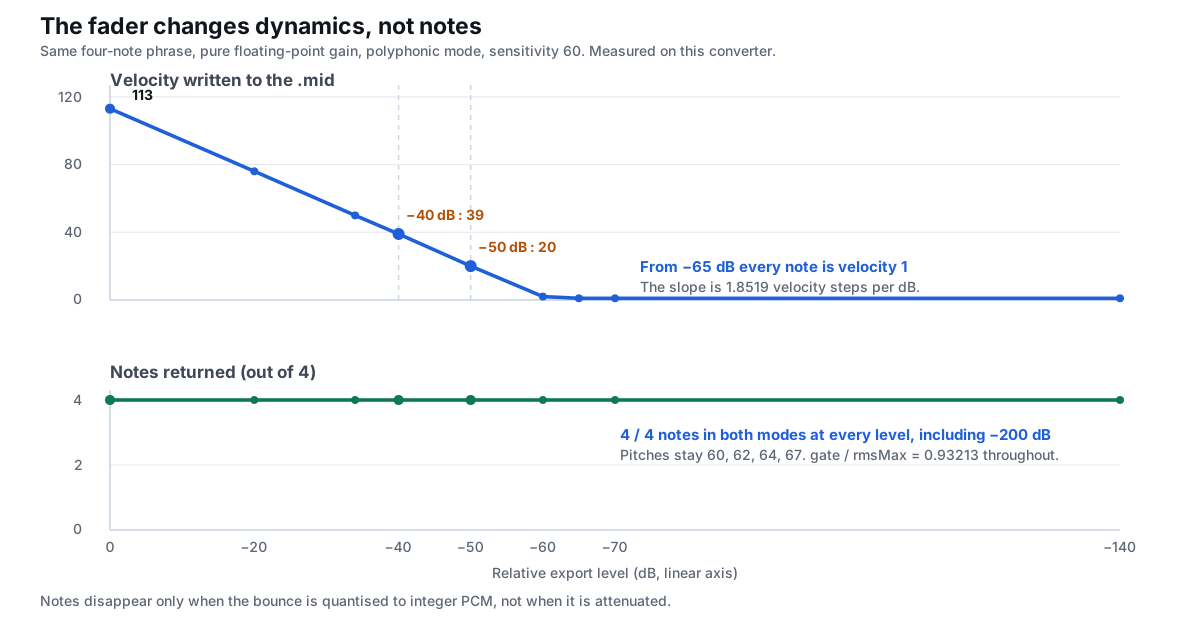
The slope is linear: 100/54 = 1.8519 velocity steps per dB, which is about 11–12 steps for every 6.02 dB of level — the same value the four-DAW overview measured over its first six steps. From −65 dB downward every note is velocity 1, the quietest value the format allows, so further attenuation is invisible in the file’s dynamics. Velocity here is derived from loudness, not from how the part was played, which is also why it is nearly flat across the four notes: why converted MIDI sounds robotic covers the feel, and how loud a note has to be before it hits velocity 127 gives the top of the curve.
The practical fix is not at export. Convert the quiet file, then scale the velocities in Cubase’s MIDI editor or with the logical editor. What the browser controls can and cannot change explains why this page cannot do that for you: its five controls re-run the segmentation, they do not edit the note events.
7. Where notes really start dropping: the bit depth of the bounce
Everything above is a pure gain change on floating-point samples. A real Cubase bounce is not floating point unless you ask for it: a 16-bit or 24-bit WAV or AIF stores the signal as integers, and the rounding error is a fixed absolute size that does not shrink with the signal. To measure that, we quantised each scaled clip to integer PCM referenced to full scale, clamped it, and decoded it back to floats exactly as the browser decoder would.
| Level | Peak (LSB) | Poly notes | Mono notes | What came back |
|---|---|---|---|---|
| 0 dB | 20478 | 4 | 4 | 60,62,64,67 |
| −20 dB | 2048 | 4 | 4 | 60,62,64,67 |
| −33.98 dB | 410 | 4 | 4 | 60,62,64,67 |
| −40 dB | 205 | 4 | 4 | 60,62,64,67 |
| −45 dB | 115 | 4 | 4 | 60,62,64,67 |
| −50 dB | 65 | 4 | 4 | 60,62,64,67 |
| −55 dB | 36 | 4 | 4 | 60,62,64,67 |
| −60 dB | 20 | 4 | 3 | mono lost E4 — 60,62,67 |
| −65 dB | 12 | 4 | 1 | mono only D4 — 62 |
| −70 dB | 6 | 4 | 0 | mono empty; poly still 60,62,64,67 |
| −80 dB | 2 | 7 | 0 | poly fractured into 60,102,62,104,64,106,67 |
A finer sweep at 1 dB steps puts the first break at −58 dB: clean down to −57 dB, and at −58 dB monophonic mode drops from four notes to three. By −70 dB the signal spans only six integer steps, monophonic mode reports nothing, and polyphonic mode is still holding all four pitches. At −80 dB, with a two-step peak, even polyphonic mode breaks — it returns seven objects including octave ghosts (102, 104, 106) that were never played. The quantisation noise has become a spectrum of its own, and the harmonic-salience gate in monophonic mode is the first thing to fail. Why the two modes fail differently explains the mechanism.
Now the useful half. We repeated the identical sweep as a 24-bit integer bounce:
| Level | Peak (LSB) | Poly notes | Mono notes |
|---|---|---|---|
| 0 dB | 5 242 562 | 4 | 4 |
| −40 dB | 52 426 | 4 | 4 |
| −50 dB | 16 578 | 4 | 4 |
| −60 dB | 5 243 | 4 | 4 |
| −70 dB | 1 658 | 4 | 4 |
| −80 dB | 524 | 4 | 4 |
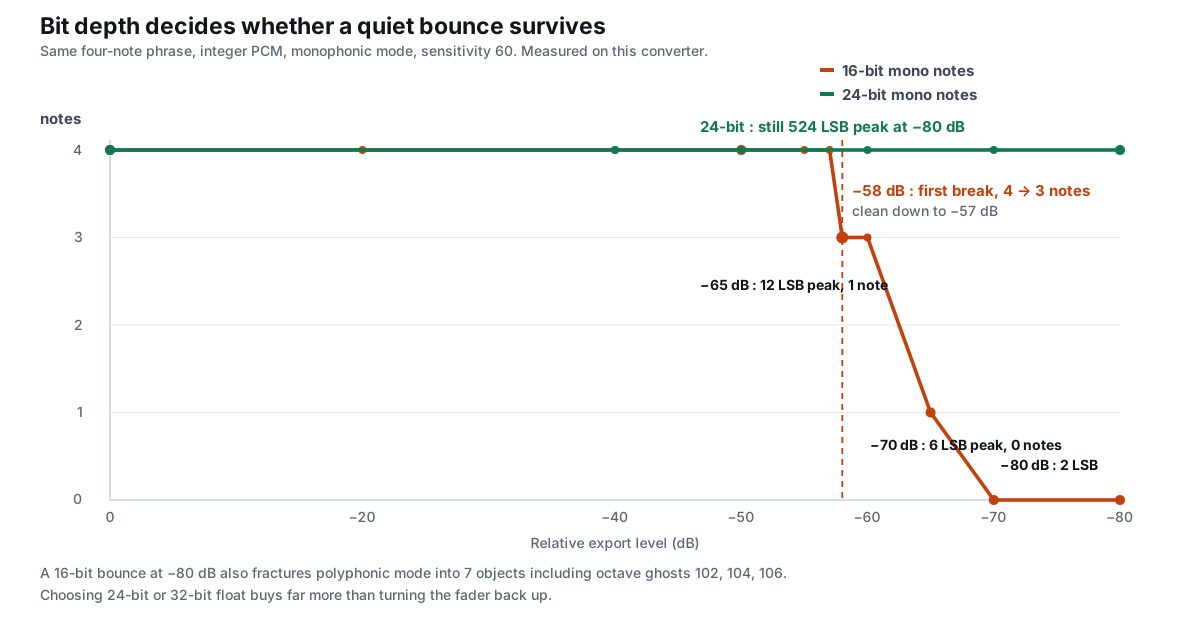
Not one note was lost at any level, in either mode. At −80 dB a 24-bit bounce still has 524 integer steps of peak where a 16-bit bounce has two. The variable that decides whether a quiet part survives is bit depth, not fader level. If you are bouncing a very quiet part in Cubase, choosing 24-bit (or 32-bit float) instead of 16-bit buys far more than turning the level back up. The file format itself is a separate question — one .m4a can be lossless ALAC or 32 kbps AAC, and that choice has its own measured effect, while how to prepare the input file covers the container side.
8. Can sensitivity rescue a very quiet 16-bit bounce?
Partly, and with a catch. Sensitivity moves the gate interpolation and the salience threshold, so on a quantisation-damaged file it can admit frames that the default setting rejects. We swept it on three low-level 16-bit bounces:
| Level | sens 0 | 20 | 40 | 60 | 80 | 100 |
|---|---|---|---|---|---|---|
| −50 dB | 4 / 0 | 4 / 0 | 4 / 0 | 4 / 4 | 4 / 4 | 4 / 4 |
| −60 dB | 4 / 0 | 4 / 0 | 4 / 0 | 4 / 3 | 4 / 4 | 4 / 4 |
| −70 dB | 4 / 0 | 4 / 0 | 4 / 0 | 4 / 0 | 5 / 4 | 10 / 4 |
At −70 dB, sensitivity 80 finally gets monophonic mode back to four notes — but polyphonic mode grows to five, and at sensitivity 100 it returns 10 note objects, six of them ghosts created by the quantisation noise. That is the standard failure mode of raising sensitivity on damaged audio: it keeps more noise, not more real notes. The honest order is to fix the export first (24-bit, or a healthier level), then leave the sliders alone. If you have already let ghost notes into the file, the cleanup passes are what remove them, and the troubleshooting order puts sensitivity third for this reason.
9. What the .mid actually contains at every level
The cleanest proof that level does not change the notes is the file itself. We built the Standard MIDI File at each level and parsed the bytes back with a running-status parser:
| Level | Bytes | Format / tracks / TPQ | on / off | Meta events | prog / bend |
|---|---|---|---|---|---|
| 0 dB | 89 | 1 / 2 / 480 | 4 / 4 | FF51×1, FF58×1, FF2F×2 | 0 / 0 |
| −20 dB | 89 | 1 / 2 / 480 | 4 / 4 | FF51×1, FF58×1, FF2F×2 | 0 / 0 |
| −40 dB | 89 | 1 / 2 / 480 | 4 / 4 | FF51×1, FF58×1, FF2F×2 | 0 / 0 |
| −50 dB | 89 | 1 / 2 / 480 | 4 / 4 | FF51×1, FF58×1, FF2F×2 | 0 / 0 |
| −60 dB | 89 | 1 / 2 / 480 | 4 / 4 | FF51×1, FF58×1, FF2F×2 | 0 / 0 |
| −70 dB | 89 | 1 / 2 / 480 | 4 / 4 | FF51×1, FF58×1, FF2F×2 | 0 / 0 |
Every file is 89 bytes, format 1, 2 tracks, 480 ticks per quarter note, one channel, with 4 note-on and 4 note-off events, zero program-change and zero pitch-bend. A byte-for-byte diff between the 0 dB and −70 dB exports finds exactly 8 differing bytes out of 89, at offsets 52, 57, 61, 66, 70, 75, 79, 84 — all eight are velocity bytes going from 113 to 1. Not one pitch, start time, end time or duration byte changes. The .csv tells the same story: with the velocity column stripped, the note list is identical at every level; the file size only shrinks from 197 to 193 to 189 bytes because “113” takes three characters and “1” takes one.
That 89-byte shape is the same file every host receives, and what a MIDI file actually is explains why it contains instructions rather than sound. For the byte-level anatomy, three routes to a MIDI file compared byte by byte shows a recording, a hand-drawn part and a score export all ending in this same shape, and how big these files can get explains why size tracks note count rather than audio level. If you want the seconds rather than ticks, the CSV note list is the closer record of what the analyser saw.
10. Export-level checklist for Cubase
- Do not re-bounce to chase level. From 0 dB to −140 dB the note list was
60,62,64,67in both modes. A normalised bounce is not more accurate. - Choose 24-bit or 32-bit float for a quiet part. 16-bit first broke at −58 dB; 24-bit held four of four notes at −80 dB. This is the only export-level decision that changes which notes come back.
- Expect low velocity, and plan to fix it. Velocity falls about 11–12 steps per 6.02 dB and clamps at 1 below −65 dB. Scale velocities in Cubase after import, or leave them if the part is meant to be soft.
- Keep the region long enough. Level does not delete notes, but a tightly trimmed region does — a region under 200 ms returns none. Give each note room.
- Export mono for a single line. The analyser averages channels before it measures anything, so a hard-panned part costs 11 velocity steps; see the four-DAW export overview for the channel measurement.
- Do not raise sensitivity to rescue a damaged bounce. At −70 dB and 16-bit, sensitivity 100 returned 10 polyphonic objects, six of them ghosts. Fix the bit depth, not the slider.
- Check the CSV before the piano roll. With the velocity column removed, a quiet export and a loud one should diff clean. If the pitches differ, the cause is elsewhere: check format and mode first.
The BPM box is not a level fix either: it is written verbatim into the file and moves no notes — how accurate the written tempo is measures that exactly. If you are bouncing several parts, do them one file at a time; why there is no folder-drop batch button explains the workflow. On a phone the same page works with a file from the share sheet; mobile audio to MIDI covers the input differences.
What Cubase has built in (context only, not our measurements)
Cubase ships a selection-based pitch-to-MIDI action for audio parts, so there is a route that never leaves the project. That is a menu-level fact about the application, not a number from this site, and it is not what this page tests. The reason an exported file is still worth discussing is simpler: an audio file is the one artifact any host can hand to this page, and an SMF .mid is the one artifact any host can take back. For the hosts where we walked the import path separately, see FL Studio, Ableton Live and Logic Pro. If your goal is per-note expression rather than a note list, stay in the DAW: our 89-byte export has nowhere to store it.
Questions people actually ask
Can Cubase convert audio to MIDI?
Yes, but if the real question is whether a quiet Cubase bounce loses notes, the answer is no: the same four-note phrase returned all 4 notes at −40 dB and −50 dB, stayed 4/4 through −200 dB, and only its velocity fell (113 → 39 → 20 → 1). What actually removes notes is integer bit depth, not the fader — a 16-bit bounce first breaks at −58 dB, while 24-bit still returns 4/4 at −80 dB. Export the audio, drop it on this converter, keep the level you have, and fix velocity in Cubase afterwards. Staying inside Cubase only becomes necessary when you need pitch bend or separate parts: the file this converter writes has 0 pitch-bend events and 1 note channel.
Will a quiet Cubase export lose notes in audio to MIDI?
No, not from level alone. We scaled one four-note phrase to −40 dB, −50 dB, −60 dB and as far as −200 dB; every level returned the same four pitches (60,62,64,67) in both modes. Velocity fell from 113 to a floor of 1, but the note list never changed. The detector’s gate is computed as a ratio of the file’s own RMS values, so scaling the whole signal leaves every comparison unchanged.
Why is my converted MIDI so quiet then?
Because velocity is derived from loudness: round(20 + (db + 60) × 100 / 54), clamped to 1..127. At −40 dB the four notes came back at velocity 39, at −50 dB at 20, and below −65 dB at 1. Scale the velocities in Cubase’s MIDI editor after import rather than re-bouncing; the pitches are already correct.
At what export level do notes actually start dropping?
On a pure floating-point gain change, never — we went to −200 dB without losing a note. On a real 16-bit integer bounce the first break is at −58 dB (clean to −57 dB), monophonic mode reaches zero notes by −70 dB, and polyphonic mode fractures into seven objects at −80 dB. A 24-bit bounce held all four notes at −80 dB. The threshold is bit depth, not the fader.
Should I normalise the bounce before converting?
It will not improve the note list. Measured across 0 to −140 dB, gate / rmsMax stayed at 0.93213 and all four notes survived at every level. Normalising is useful if you are stacking effects with a fixed noise floor; it does nothing for a ratio-based detector. If you do normalise, avoid clipping — a clipped waveform genuinely does change the spectrum.
Does 16-bit versus 24-bit really matter for this?
Yes, on quiet material. At −70 dB a 16-bit bounce has a peak of 6 integer steps and monophonic mode returns zero notes; a 24-bit bounce still has 1 658 steps and returns all four. At −80 dB the 16-bit file’s peak is 2 steps and polyphonic mode grows octave ghosts, while 24-bit stays clean. Choose 24-bit or 32-bit float when the part is quiet.
Will raising sensitivity bring the notes back on a quiet 16-bit file?
Only partly, and it costs you. At −60 dB and 16-bit, sensitivity 60 returned 3 of 4 monophonic notes and sensitivity 80 returned 4. At −70 dB, sensitivity 80 got monophonic mode to 4 notes but polyphonic mode grew to 5, and at sensitivity 100 it returned 10 objects — six of them ghosts. Re-export at a higher bit depth instead.
Does the exported .mid get smaller when the audio is quieter?
No. Every level from 0 dB to −70 dB produced an 89-byte format-1 file with 2 tracks, 480 TPQ, 4 note-on and 4 note-off events, zero program-change and zero pitch-bend. Only 8 bytes differ between the loudest and quietest exports, and all 8 are velocity bytes. The CSV shrinks from 197 to 189 bytes purely because three-digit velocities become one-digit ones.
Why did converting my Cubase bounce give me no notes at all?
Level is the least likely cause. Check the region length first — a region under 200 ms returns zero notes even though the shortest-note control reads 60 ms. Then check the mode: a chord in monophonic mode can collapse to nothing. Then check the bit depth if the bounce is very quiet. The four-step troubleshooting order walks format, mode, sensitivity and shortest note in that sequence.
Convert an exported file now — runs in your browser, nothing is uploaded.
Related guides
- Other DAWs audio to MIDIWhich export settings change the notes: length, level, channels, silence and fades
- Reaper audio to MIDIWhy a region under 200 ms returns no notes: the 92.88 ms window tax and the 155 ms knife edge
- Mono vs polyWhy the two detection modes fail differently on the same clip
- Fix dropped notesThe order to fix it: format, mode, sensitivity, shortest note
- Humanize robotic MIDIWhy the export is grid-locked and velocity-flat, and the moves that fix the feel
- MP3 to MIDI converterHow loud a note has to be before it hits velocity 127
- MIDI editorWhat the browser controls can and cannot change after conversion
- What is a MIDI fileInstructions not audio: format 0/1/2, tracks, channels and what each costs in bytes
- How to make a MIDI fileThree routes, one 2-track file, compared byte by byte
- MIDI file sizeWhy size tracks note count rather than audio length or level
- Audio to notesThe 7-column CSV and the exact seconds behind every onset
- M4A and FLAC to MIDIOne .m4a can be lossless ALAC or 32 kbps AAC
- WAV to MIDIHow to prepare the file before you convert
- Sample rate & MIDIWhy 44.1k, 48k and 22.05k return the same note list
- Clean up a converted MIDIThe passes that remove ghost notes and split objects
- Bass line extractionWhy the converter reads the whole signal and cannot isolate one voice
- Drum transcription limitsThe 55 Hz floor, the 4000 Hz ceiling and the 11.61 ms grid
- Pitch bend detectionWhat a glide adds to your MIDI, and when it matters
- Batch convert audioWhy there is no folder-drop button, and what one file at a time costs