No — this converter cannot emit MIDI while you play, and the reason is the design, not the speed of your machine. The decision about whether a frame contains a note is made against a single threshold computed from every frame in the whole file: the quietest tenth of all frame loudnesses, plus a fraction of the distance to the loudest frame. That number does not exist until the file has ended. We converted the exact same first second of audio five times, changing only what came after it, and the opening second came back with 2, 2, 3, 1 and 2 notes as the whole-file gate took the values 0.30800, 0.04497, 0.29941, 0.40075 and 0.04497. With a loud tail, both opening notes were deleted and only one phantom note remained. A note that has not happened yet can erase a note that already has, so nothing in the first second is final while the recording is still running. What this page does instead is quick and private: record a take, drop the finished file here, and get a Standard MIDI File in your browser, with no upload. The rest of this page is the measurement that explains why that boundary is real rather than a missing feature.
What "real time" would require, in three measured numbers
Before blaming hardware, it helps to write down the smallest delay that this analyser could ever have, even if it ran infinitely fast. The signal is resampled to 22 050 Hz and read with a 2048-sample window stepped 256 samples at a time. Three consequences follow, all measured from the source and from real runs on this site:
- One window is 2048 ÷ 22 050 = 92.879819 ms of audio — exactly 8 analysis frames of 11.609977 ms. A frame at time t reads audio that has not finished yet, so every decision looks forward by up to that much.
- At the default shortest-note setting of 60 ms, a note must span at least 5 frames = 58.0499 ms before it can be emitted at all.
- Repeated notes of the same pitch are bridged across silences shorter than 7 frames = 81.2698 ms, so the analyser has to wait out that gap before it can close a note.
We then fed isolated tones of 40, 60, 80, 100, 120, 140, 150, 155, 160, 200, 300 and 500 ms through the real detector. Everything up to 150 ms returned zero notes; the first note appeared only at 155 ms (pitch 60, onset 0.0116 s, velocity 113). That 155 ms is not a latency budget we can tune down by buying a faster CPU — it is the sum of a forward-looking window and minimum-length gates. A live display that updated in under 155 ms would have nothing to show.
There is a separate, more fundamental limit on top of it. The window and the note-length gates are local; the threshold that decides which frames count as notes is not.
One gate belongs to the entire file
The grouping step in dsp.js computes a noise floor as the 10th percentile of the RMS of all frames, then sets the voice gate to floor + (rmsMax − floor) × (0.32 − 0.30 × sensitivity). At sensitivity 60 the multiplier is 0.14. For a 2.0-second four-note phrase the analyser produces 165 frames, the floor is 0.29586, the loudest frame is 0.32121, and the gate is therefore 0.29941. Every one of the 165 frames is compared with that single number, including frame 0.
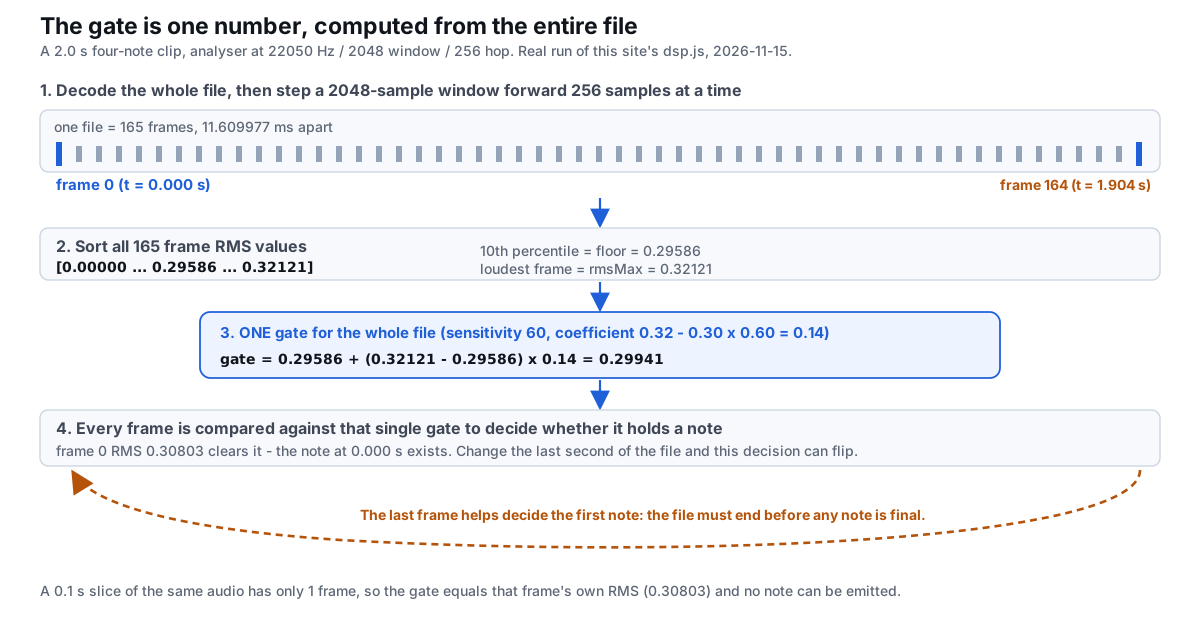
0.30803) and the five-frame minimum makes any note impossible.This is why "just process each chunk as it arrives" is not a small engineering change. The last quiet second of a take drags the 10th percentile down; the last loud second pushes the maximum up. Both rewrite the threshold used at the beginning. You can see the mechanism from the source (dsp.js is 12 466 bytes, midi.js is 2 768 bytes) without running anything, but the more convincing evidence is to hold the beginning fixed and change only the ending.
The future changes the past: five endings, one identical opening
We built a one-second head containing C4 then D4, then appended five different tails. The first second of audio is byte-identical in all five files. Each file was converted as a complete recording with identical settings (polyphonic, sensitivity 60, shortest note 60 ms). Here is what came back inside that unchanged first second:
| Appended tail | Frames | Whole-file gate | Notes in first 1.0 s | Onsets (s) |
|---|---|---|---|---|
| None (1.0 s file) | 79 | 0.30800 | 2 | 0.0000, 0.5108 |
| 1 s silence | 165 | 0.04497 | 2 | 0.0000, 0.4644 |
| 1 s normal second half | 165 | 0.29941 | 3 | 0.0000, 0.4992, 0.9985 |
| 1 s loud tone | 165 | 0.40075 | 1 | 0.9288 |
| 5 s silence | 509 | 0.04497 | 2 | 0.0000, 0.4644 |
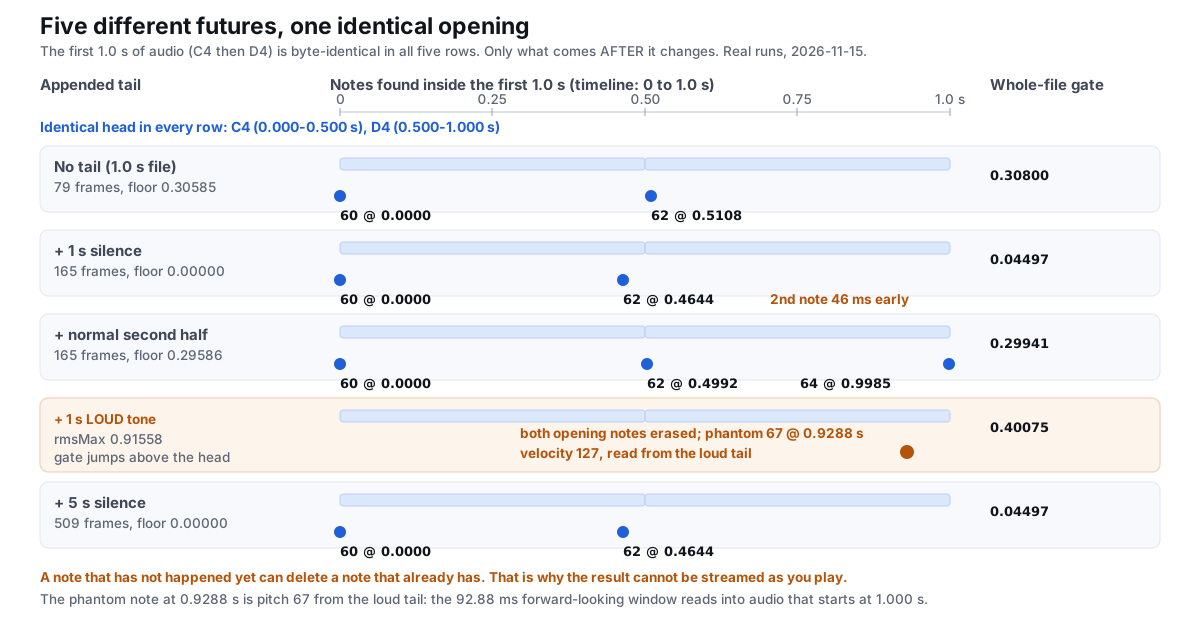
92.88 ms window is what lets a frame at 0.9288 s read into audio starting at 1.000 s.Three things in that table are worth isolating. First, silence does not just add quiet frames: it collapses the 10th percentile to 0.00000, so the gate falls from 0.29941 to 0.04497, and an earlier frame with RMS 0.05540 qualifies as the note's start. That is the same mechanism measured in detail on why a first note lands early, but here it is being used as a causality test. Second, a loud tail raises the loudest frame to 0.91558, lifting the gate to 0.40075 — above the entire opening second — so both real notes vanish. Third, the five-second silence tail gives exactly the same result as the one-second silence tail, because the gate depends on the distribution of frames, not on how long you keep waiting.
The consequence for live tracking is blunt: at the moment a performer plays the first note, the converter cannot know whether a loud chord is coming in three seconds. If one is, that first note may not exist in the final result. A streaming converter would have to commit to the note before the evidence that removes it arrives. The seven-column note list described in audio to notes shows the same seconds to four decimals, and it is only available after the whole pass finishes.
Feed the same audio in growing chunks and it rewrites its own beginning
A natural workaround is to convert repeatedly: take the audio so far, convert that as a file, then convert again once more has arrived. We ran exactly that experiment. One four-note phrase (C4, D4, E4, G4) was sliced into six prefixes, and each prefix was analysed and segmented as a complete file in its own right:
| Prefix | Frames | Whole-file gate | Notes | Pitches | Onsets (s) |
|---|---|---|---|---|---|
| 0.1 s | 1 | 0.30803 | 0 | — | — |
| 0.2 s | 10 | 0.31724 | 1 | 60 | 0.0116 |
| 0.3 s | 18 | 0.31724 | 2 | 60, 60 | 0.0116, 0.1509 |
| 0.5 s | 36 | 0.31746 | 1 | 60 | 0.1625 |
| 1.0 s | 79 | 0.30800 | 2 | 60, 62 | 0.0000, 0.5108 |
| 2.0 s | 165 | 0.29941 | 4 | 60, 62, 64, 67 | 0.0000, 0.4992, 0.9985, 1.4977 |
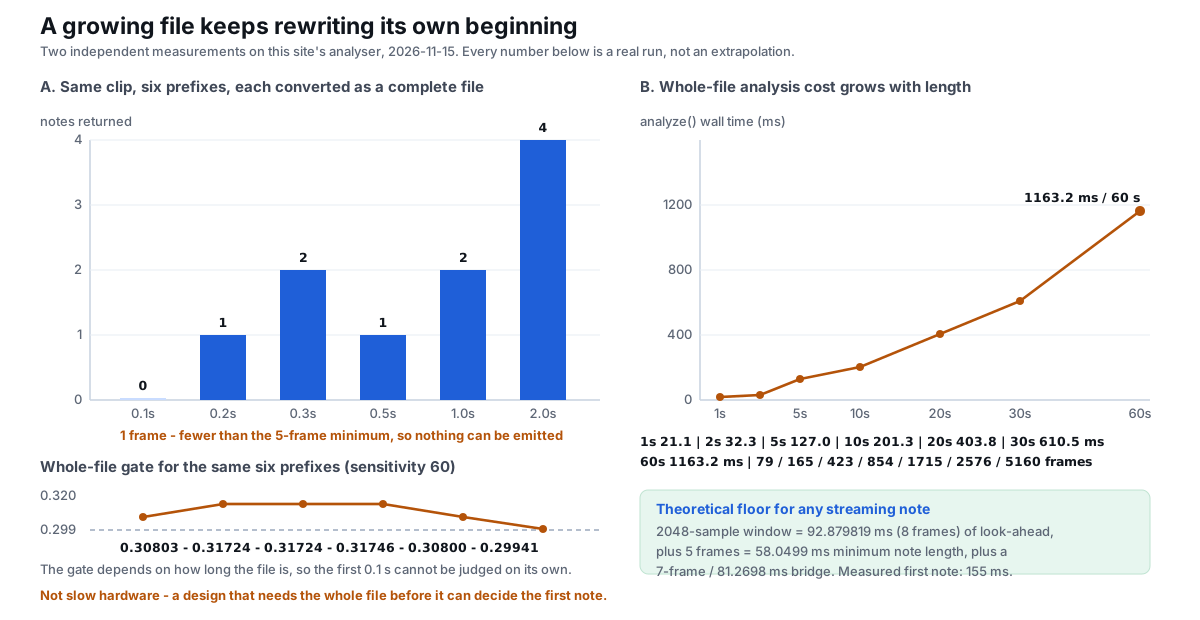
Read the note counts in order: 0, 1, 2, 1, 2, 4. A live display built this way would show two notes at 0.3 seconds, then take one of them back at 0.5 seconds. The first onset is not stable either: 0.0116, 0.0116, 0.1625, 0.0000, 0.0000 seconds. The 0.1 s prefix produces no note at all because one frame is fewer than the five-frame minimum. This is the reproducible proof that a growing file keeps re-deciding its own past, and it is why the only honest output is one produced after the recording stops.
Why a faster computer does not fix it
The analysis pass is explicitly a batch job. The source contains one setTimeout call, used to split the work into chunks of 300 frames so the browser stays responsive; the promise resolves only after the last frame is done. Segmenting — the cheap step that reapplies the gate when you move a slider — is separate. We timed the whole analyze() pass on files from 1 to 60 seconds:
| File length | Frames | analyze() time | ms per second of audio |
|---|---|---|---|
| 1 s | 79 | 21.1 ms | 21.08 |
| 2 s | 165 | 32.3 ms | 16.17 |
| 5 s | 423 | 127.0 ms | 25.41 |
| 10 s | 854 | 201.3 ms | 20.13 |
| 20 s | 1715 | 403.8 ms | 20.19 |
| 30 s | 2576 | 610.5 ms | 20.35 |
| 60 s | 5160 | 1163.2 ms | 19.39 |
A one-minute recording takes about 1.16 seconds to analyse, and the cost is roughly linear at 19–25 ms per second of audio on this machine. That is fast, and it is also beside the point: even if the number were zero, the gate would still be the 10th percentile of all 5160 frames, so the first note could not be released until the last frame had been read. Slow hardware is a legitimate complaint about a live pitch tracker; here it is not the binding constraint. The one-file-at-a-time workflow is a consequence of the same batch design.
Deterministic, local, and not a streaming model
It is worth being precise about what this engine is, because "AI audio to MIDI" is often assumed to mean a model inferring notes frame by frame. A read of the shipped code and ten repeated runs give a different picture:
Math.randomappears 0 times;fetch,XMLHttpRequestandWebSocketappear 0 times. Nothing is inferred from a remote service and nothing is uploaded.- Ten exports of the same four-note phrase produced one distinct SHA-256 hash (
b4f2495bac82e97d) across all ten, each an 89-byte MIDI file. Ten independentanalyze()+segment()runs produced one distinct note-list signature. - The constants are fixed: window 2048, target sample rate 22 050, hop 256, ticks per quarter 480.
Determinism on its own would not forbid a live implementation — a fixed streaming algorithm can be perfectly repeatable. The point is what the repeatability is attached to: the same whole file always gives the same answer, because the answer is a function of a statistic computed over the entire recording. There is no per-frame state that could be emitted as a provisional note, and no model that could be allowed to change its mind gradually. That is a different architectural commitment from a live pitch-to-MIDI tracker, and it is why the honest description of this tool is "fast offline conversion in your browser", not "real-time tracking".
Where that leaves you: three ways to go
Not every job belongs here, and it saves time to say which is which. Each line below hangs off a number measured on this site rather than a general claim about the market.
- Convert it here. Record the take with a phone, a DAW or your system recorder; drop the finished file on the converter; download the .mid. A 60-second file costs 1163.2 ms of analysis, uses 0 network calls, and gives you a result you can check in the piano roll.
- Go and install a live tracker instead. If you need notes appearing while the note is still sounding, this engine cannot do it: the first isolated tone needs 155 ms before any output exists, and the gate needs all 165 frames of even a two-second file. Dedicated real-time pitch-to-MIDI software exists for that job; we do not benchmark it here. When a plugin is the right route explains the decision without turning this page into a shopping list.
- You need a DAW anyway. If what you want is pitch bend, separate parts, or controller data, no conversion setting on this page will produce them: in earlier runs on this site a bent note produced 0 pitch-bend events, and a mixed recording came back as 1 note track. Use the .mid as a starting point and clean up the converted MIDI in your DAW.
If you are starting from a microphone rather than a file, what this converter does with a recording covers the record-first workflow and how room noise changes the note list once the take is a file.
What about tools that advertise live tracking?
They are solving a different problem with a different architecture, usually a local pitch tracker with a short fixed buffer. We have not measured their latency or accuracy on this site, so we will not quote figures for them. The measurements above describe one specific converter — this one — and are reproducible from its own source.
How to reproduce the causality test yourself
This takes about two minutes and needs no special equipment:
- Record or synthesise a one-second phrase with two clear notes, and keep a copy of that exact first second.
- Make a second file by appending one second of silence, and a third by appending one second of a loud sustained tone.
- Convert all three here with identical settings, download the CSV for each, and compare the first two
start_secvalues.
On our phrase the first file gave 0.0000, 0.5108, the silence version gave 0.0000, 0.4644, and the loud-tail version gave neither note. The audio at the start never changed. That is the whole argument in one experiment, and it is also a useful habit: trust a published number only when you can rebuild the input that produced it.
Questions people actually ask
Can you convert audio to MIDI in real time?
Not with this converter: the first note is not decided until the last frame is read. The voice gate is the 10th percentile of all frame loudnesses, and on a 2.0-second, 165-frame file it works out to 0.29941. Change only the tail of that file and the gate becomes 0.40075, which deleted both notes in the unchanged opening second. A live system would have to output those notes before the tail existed. The shortest isolated tone that produced any note here was 155 ms, so even the theoretical floor is far from instantaneous.
Is audio to MIDI an offline process?
Here, yes — but a short one: a 60-second file takes 1163.2 ms to analyse. The analysis pass walks all 5160 frames in chunks of 300 before it resolves, at roughly 19–25 ms per second of audio on this machine. There are 0 network calls in the shipped code, so "offline" describes both the batch architecture and the fact that the file never leaves your browser.
Does a faster phone or computer make it real time?
No. Speed changes the 1163.2 ms, not the dependency on the whole file. Analysis time scales close to linearly (21.1 ms at 1 s, 403.8 ms at 20 s, 1163.2 ms at 60 s), so a faster device shortens the wait. It cannot make a 10th-percentile gate computable from a prefix: six prefixes of one clip returned 0, 1, 2, 1, 2 and 4 notes as the gate drifted from 0.30803 to 0.29941. What works on a phone covers the on-device time cost separately.
Does trimming the end of a file change the notes at the beginning?
Yes, and by more than a rounding error. With the first second byte-identical, appending one second of silence lowered the gate from 0.30800 to 0.04497 and moved the second note from 0.5108 s to 0.4644 s; appending a loud tone raised the gate to 0.40075 and erased both opening notes, leaving a single phantom pitch 67 at 0.9288 s. Trim and export a tight region before converting, then fix velocity and timing in the DAW.
Convert a finished file now — runs in your browser, nothing is uploaded.
Related guides
- Microphone to MIDIWhy this converter takes a recording, not a live stream
- Audio to MIDI pluginWhen an installed tool is the right route instead
- GarageBand audio to MIDIHow leading silence moves the first note, measured
- Audio to notesThe seven-column note list behind every number on this page
- Batch convert audioWhy there is no folder-drop button
- Clean up a converted MIDIThe five passes that turn a raw export into a usable part